Nifty 50
- Kotak Mahindra Bank₹4408.10 (1.88%)
- Titan Company₹4,377-173.00 (-3.80%)
- BSE₹3,35651.00 (1.54%)
- Adani Enterprises₹2,743-106.90 (-3.75%)
- Bharti Airtel₹1,833.9023.40 (1.29%)
- Hindalco Industries₹910.85-29.65 (-3.15%)
- ICICI Bank₹1,357.5014.70 (1.09%)
- JSW Steel₹1,230-29.60 (-2.35%)
- Coal India₹414.502.85 (0.69%)
- Bharat Electronics₹378.30-9.10 (-2.35%)
- Max Healthcare₹9085.50 (0.61%)
- Infosys₹992-21.85 (-2.16%)
- HDFC Life Insurance ₹546.052.10 (0.39%)
- Asian Paints₹2,372.10-52.10 (-2.15%)
- Bajaj Finance₹963.850.75 (0.08%)
- Mahindra & Mahindra₹2,800-55.00 (-1.93%)
- Apollo Hospitals₹7,9172.50 (0.03%)
- Adani Ports₹1,750.10-33.30 (-1.87%)
- L&T₹3,701.50-68.50 (-1.82%)

- Offerings
- Tools & Platforms
Tools & Calculators
- Open API
- Calculators
- SIP Calculator
- CAGR Calculator
- Compound Interest Calculator
- FD Calculator
- RD Calculator
- EPF Calculator
- Retirement Calculator
- HDFC SIP Calculator
- Mutual Fund Return Calculator
- Lumpsum Calculator
- Step Up SIP Calculator
- ETF SIP Calculator
- Brokerage Calculator
- Equity Margin Calculator
- SWP Calculator
- EMI Calculator
- MTF Calculator
- Margin Pledge Calculator
- Algo Strategy
- Markets
Stocks
F&O
Mutual Funds
- More
SEBI's Validated UPI Framework: Enhanced Security for HDFC SKY Customers Protecting Your Investments with Advanced UPI Verification
By HDFC SKY | Updated at: Sep 29, 2025 01:08 PM IST
Open Free Demat Account
Open Free Demat Account
The Securities and Exchange Board of India (SEBI) has launched ground breaking measures to protect investors from fraud and ensure secure digital payments in the securities market. As your trusted investment platform, HDFC SKY is implementing these new security protocols to safeguard your financial transactions.
What’s New: Validated UPI Framework
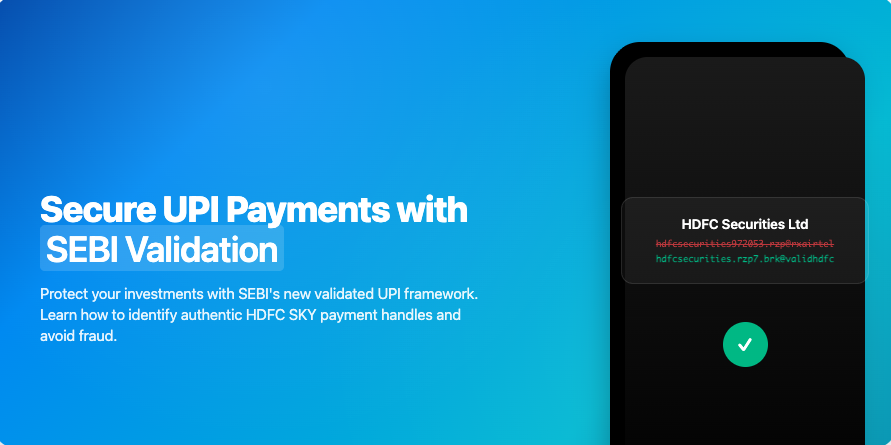
Starting October 1, 2025, SEBI has mandated that all registered intermediaries, including brokers like HDFC Securities, must use validated UPI handles ending with “@valid” for all investor-facing transactions. This revolutionary step addresses the growing concern of fraudulent entities impersonating legitimate financial institutions.
Key Features of the New System:
Enhanced Security Protocol
⦁ All legitimate UPI IDs now end with “@valid” suffix
⦁ Standardized format for easy identification
⦁ Bank verification required before issuing “@valid” handles
How This Protects HDFC SKY Customers
The new framework directly combats several fraud tactics:
- Impersonation Prevention: Fraudsters can no longer create fake UPI IDs mimicking legitimate brokers
- Payment Routing Security: Ensures your money reaches only verified, SEBI-registered entities
What changes for you?
Nothing at all! The way you make payments today, will remain same.
Just to refresh, after you login to your HDFC SKY app/ web, go to funds section, and click on Add funds.
Post entering the amount of your desired choice, you will see the options to choose from UPI or Netbanking. When you select the mode as UPI, you will be redirected to the UPI app of your choice (Google Pay, PhonePE, Paytm, BHIM, Payzapp or so on)
While making your payments, you can check the format of the UPI handles on the payment app while making the payment!
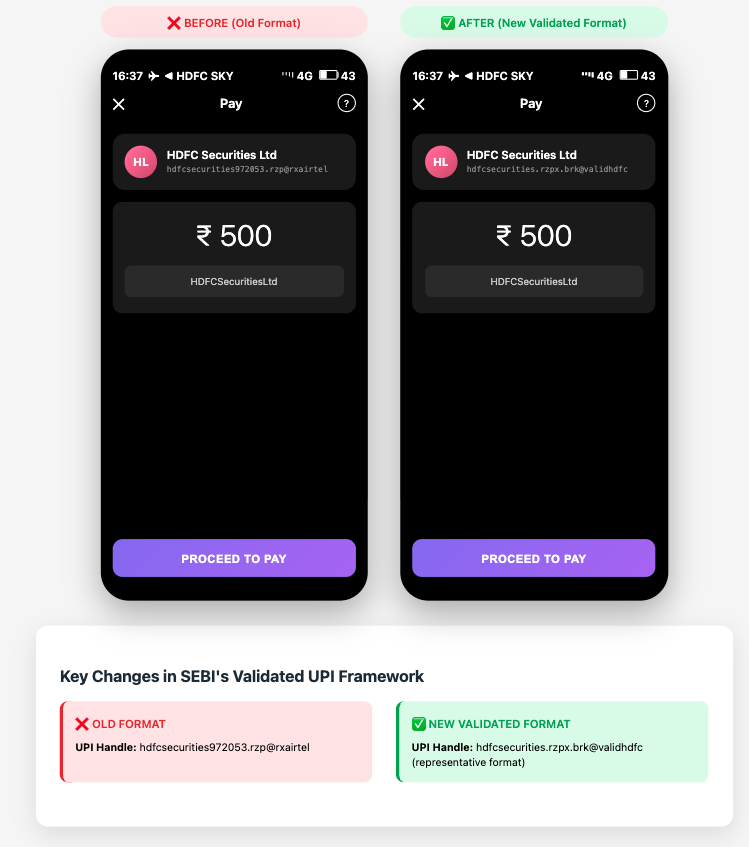
This is how this will look like:
How to Verify Payment Authenticity
Step-by-Step Verification Process:
1.Check the UPI Handle Format
- Ensure it ends with “@validhdfc”
- The format will be businessname.rzpx.brk@validbank
- In our case, business name will be hdfcsecurities, rzp suffix as it is our payment aggregator we use for managing payments
- Followed by .brk as we lie in the intermediary category of ‘brokers’
- Followed by @validhdfc , as our banking account is HDFC BANK
2. Look for Visual Confirmation
- This appears in your payment app (Google Pay, PhonePE, Paytm, BHIM, etc. as shown in the picture above )
3. Use SEBI Check Tool
- Manually verify UPI IDs when in doubt
Important Security Reminders
Red Flags to Watch For:
- UPI IDs not ending with “@validhdfc”
- Absence of green thumbs-up verification icon
- Misspelled merchant names or suspicious formatting
- Unsolicited payment requests via social media or email
- Pressure tactics urging immediate payment
How to Stay Protected
Before Making Any Payment:
- Always Verify: Double-check UPI handles against our official list
- Look for Icons: Ensure the green verification triangle is visible
- Use Official Channels: Only initiate payments through HDFC SKY’s official platform
- When in Doubt: Contact our customer support for verification
Conclusion
SEBI’s validated UPI framework marks a significant milestone in investor protection. By implementing these advanced security measures, HDFC SKY continues to prioritize your financial safety while maintaining the convenience of digital payments.
Remember: when making payments to HDFC SKY, always verify the UPI handle ends with “@validhdfc” and look for the green verification triangle. Your vigilance, combined with these regulatory safeguards, creates a robust defense against fraud.
Stay secure, stay informed, and continue investing with confidence on HDFC SKY.
Need Help? Contact HDFC SKY customer support for any questions about the validated UPI framework or to verify payment details.
SEBI FAQs / Circular link: Link


FAQs
Is it compulsory for the investors to use the new handle only?
What should I check while making payment using the new UPI IDs/ QR Code?
Do investors also need to obtain new UPI handles to transact in the securities market?
Whom to approach if my transaction/ payment fails with the new UPI ID?

Open Free Demat Account
Open Free Demat Account
Popular Posts
- 10 Interesting Facts About NSE You Probably Didn’t KnowLast Updated: Sep 30, 2026
- 8-4-3 Rule of SIP - How Does That Work?Last Updated: Jul 30, 2025
- Let's view more exciting Post!
Popular Post from Share Market
- New Pre‑Open Rules Go Live on 7 September 2026Last Updated: Sep 4, 2026
- Trap Alert: How to Identify Common Market TrapsLast Updated: Apr 24, 2026
- When the King of Skies Encounters TurbulenceLast Updated: Jan 28, 2026
- HDFC Securities Partners with smallcase to Launch Model Portfolios on HDFC SKYLast Updated: Nov 28, 2025
- HDFC Securities Introduces SKY Signals on HDFC SKY to Strengthen Research-Driven Investments for Retail CustomersLast Updated: Nov 20, 2025
- Let's view more exciting Post!
Popular Post from Blogs
- “Bounce Back” Theme Gains Traction in 2026Last Updated: Apr 8, 2026
- 5 Takeaways for Tax Payers from the Budget 2025Last Updated: Jan 29, 2026
- Let’s view more exciting Posts

Invest Anytime, Anywhere


By signing up I certify terms, conditions & privacy policy