Nifty 50
- Bajaj Finance₹942.1016.10 (1.74%)
- HDFC Life Insurance ₹522.05-17.60 (-3.26%)
- Cipla₹1,330.9016.90 (1.29%)
- Nestle₹1,185.20-38.70 (-3.16%)
- UltraTech Cement₹10,958109.00 (1.00%)
- Eternal₹304.45-7.90 (-2.53%)
- ICICI Bank₹1,398.5013.50 (0.97%)
- Tata Motors PV₹270-5.70 (-2.07%)
- Bajaj Auto₹10,15583.00 (0.82%)
- Reliance Industries₹1,184.50-24.50 (-2.03%)
- Sun Pharmaceutical₹1,75812.90 (0.74%)
- HDFC Bank₹694.05-12.90 (-1.82%)
- SBI₹9707.00 (0.73%)
- Bharat Electronics₹364.50-6.70 (-1.80%)
- BSE₹3,26516.70 (0.51%)
- Adani Enterprises₹2,550-44.50 (-1.72%)
- Bharti Airtel₹1,8953.30 (0.17%)
- Trent₹2,775.80-46.20 (-1.64%)
- Axis Bank₹1,2122.00 (0.17%)
- Asian Paints₹2,284.80-34.60 (-1.49%)

- Offerings
- Tools & Platforms
Tools & Calculators
- Open API
- Calculators
- SIP Calculator
- CAGR Calculator
- Compound Interest Calculator
- FD Calculator
- RD Calculator
- EPF Calculator
- Retirement Calculator
- HDFC SIP Calculator
- Mutual Fund Return Calculator
- Lumpsum Calculator
- Step Up SIP Calculator
- ETF SIP Calculator
- Brokerage Calculator
- Equity Margin Calculator
- SWP Calculator
- EMI Calculator
- MTF Calculator
- Margin Pledge Calculator
- Algo Strategy
- Markets
Stocks
F&O
Mutual Funds
- More
- What is HDFC SKY API Authentication?
- Why Does HDFC SKY Use an Authentication Flow?
- Understanding the Authentication Credentials
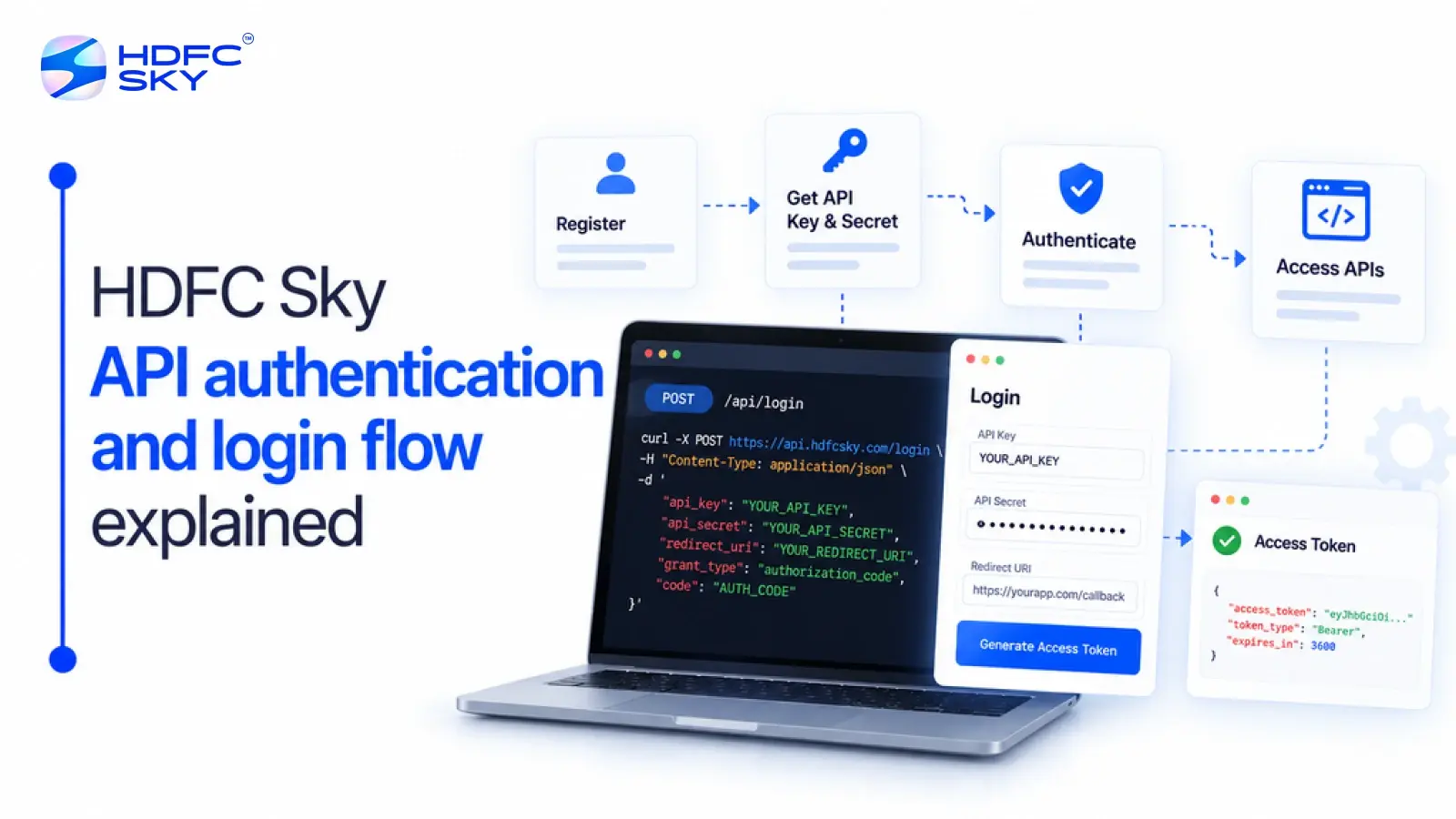
- Understanding the HDFC SKY API Authentication and Login Flow
- What Happens After Authentication?
- Security Features of the HDFC SKY Authentication Flow
- Things to Keep in Mind During Authentication
- Conclusion
- What is HDFC SKY API Authentication?
- Why Does HDFC SKY Use an Authentication Flow?
- Understanding the Authentication Credentials
- Understanding the HDFC SKY API Authentication and Login Flow
- What Happens After Authentication?
- Security Features of the HDFC SKY Authentication Flow
- Things to Keep in Mind During Authentication
- Conclusion
HDFC SKY API Authentication and Login Flow Explained
By HDFC SKY | Published at: Oct 22, 2026 04:56 PM IST
Open Free Demat Account
Open Free Demat Account
Authentication is the foundation of secure API communication. Before an application can access HDFC SKY services, both the application and the user must be verified. HDFC SKY follows a secure token-based authentication process that grants API access only after successful authentication and authorisation. This guide explains how the login and authentication flow works in a simple and easy-to-understand manner.
What is HDFC SKY API Authentication?
Before integrating the APIs, it is important to understand what authentication means. API authentication is the process of verifying an application’s identity and confirming that the user has authorised it to access HDFC SKY services.
Instead of allowing unrestricted access, HDFC SKY uses a secure token-based authentication flow. This process helps protect user accounts, prevents unauthorised access, and ensures that API requests come from trusted sources.
Why Does HDFC SKY Use an Authentication Flow?
Every API request should come from a trusted application and an authorised user. The authentication flow helps achieve this by verifying identities before granting access.
The authentication process helps to:
- Verify the application’s identity.
- Confirm that the user has authorised the application.
- Protect trading accounts from unauthorised access.
- Enable secure communication between the application and HDFC SKY.
- Support secure access to authorised APIs and services.
Together, these steps create a secure environment for both developers and investors.
Understanding the Authentication Credentials
The authentication process uses four important credentials. Each one has a specific role in establishing a secure connection.
- API Key
The API Key is a unique identifier assigned to your application when you register it on the HDFC SKY Developer Portal. It tells the platform which application is requesting access. - API Secret
The API Secret is generated along with the API Key. It verifies the identity of your application during authentication. Since it acts like a confidential password, it should always remain secure and should never be shared publicly. - Request Token
The Request Token is a temporary credential generated after the user successfully signs in and authorises the application. It is used to generate the Access Token and cannot be used directly to access APIs. It confirms that the authentication process has been completed successfully. - Access Token
The Access Token is generated after the Request Token is validated. It allows the application to make authorised API requests on behalf of the user. The application includes the Access Token in the HTTP Authorization header when making authorised API requests.
Also Read: Benefits of Algo Trading: Why More Traders Are Choosing Automated Trading
Understanding the HDFC SKY API Authentication and Login Flow
The login flow follows a series of secure steps. Each step verifies the application’s identity, confirms user authorisation, and prepares the application to access HDFC SKY APIs.
- The User Starts the Login Process
The authentication process begins when the user attempts to access an application integrated with HDFC SKY APIs. The application redirects the user to the HDFC SKY login page using its API Key. This tells the platform which application is requesting access. - The User Completes Authentication
The user enters their HDFC SKY login credentials and completes the required verification process. As part of the authentication flow, HDFC SKY requires two-factor authentication (2FA). The user receives a One-Time Password (OTP) on their registered mobile number or email address and must complete the verification before moving to the next step. - The User Authorises the Application
After successful login, the user reviews the permissions requested by the application. By accepting these permissions, the user authorises the application to access the APIs and services they have approved. - A Request Token Is Generated
Once the application is authorised, HDFC SKY redirects the browser to the registered Redirect URL. The redirected URL contains a temporary Request Token. This token confirms that the authentication process has been completed and is required to generate the Access Token. - The Access Token Is Generated
The application sends the Request Token, API Key, and API Secret to the HDFC SKY access token endpoint through a secure backend request. After successful validation, the platform returns an Access Token, which the application uses to make authorised API requests. - The Application Uses the Access Token
After receiving the Access Token, the application includes it in the Authorisation header of future API requests. This allows the application to securely access the APIs that the user has authorised without requiring repeated logins during the active session.
What Happens After Authentication?
Once authentication is complete, the application can communicate securely with the HDFC SKY platform.
Depending on the APIs enabled for the application and the permissions granted by the user, the application can perform functions such as:
- Placing trading orders
- Retrieving portfolio information
- Viewing holdings and positions
- Accessing market data
- Connecting to supported WebSocket services for live updates
The Access Token confirms that the user has successfully authenticated and authorised the application. It allows the application to access the APIs that the user has permitted during the active session.
Security Features of the HDFC SKY Authentication Flow
Several security measures work together to protect user accounts and application data.
- User Authentication
Every user must sign in using valid HDFC SKY credentials before accessing protected services. - Two-Factor Authentication (2FA)
The mandatory OTP verification adds an extra layer of security by confirming the user’s identity before access is granted. - API Key and API Secret
These credentials verify the application’s identity and ensure that only registered applications can initiate the authentication process. - Temporary Request Token
The Request Token is used only during the authentication process. It cannot be used to access APIs directly, reducing the risk of misuse. - Access Token-Based Authentication
After authentication, the application uses the Access Token for authorised API requests instead of sending the user’s login credentials with every request. This improves both security and efficiency. - Registered Redirect URL
HDFC SKY redirects users only to the Redirect URL registered with the application. This helps prevent unauthorised redirection during authentication.
Things to Keep in Mind During Authentication
Before starting the authentication process, keep the following points in mind:
- Register your application on the HDFC SKY Developer Portal before initiating the authentication flow.
- Ensure that your Redirect URL is correctly configured in your application settings.
- Complete the mandatory OTP verification during login.
- Keep your API Key and API Secret secure, as they are required to generate the Access Token.
- Use the Access Token only after successful authentication and authorisation.
These points can help ensure a smooth authentication process and reduce the chances of errors during API integration.
Conclusion
HDFC SKY API authentication uses a secure token-based process to verify both the application and the user before granting API Trading access. Understanding the role of each credential and the sequence of the authentication flow makes integration simpler and more secure. Following this process helps ensure reliable communication between your application and the HDFC SKY platform.



Open Free Demat Account
Open Free Demat Account
Popular Posts
- 10 Interesting Facts About NSE You Probably Didn’t KnowLast Updated: Sep 30, 2026
- 8-4-3 Rule of SIP - How Does That Work?Last Updated: Jul 30, 2025
- Let's view more exciting Post!
Popular Post from Trading Strategies
- Getting Started with the HDFC SKY API in PythonLast Updated: Oct 22, 2026
- How to Connect HDFC SKY with Claude Desktop (Step-by-Step MCP Setup)Last Updated: Aug 28, 2026
- HDFC Sky + OpenAlgo: A Beginner's Guide to Setting Up a Self-Hosted Algo Trading SystemLast Updated: Aug 28, 2026
- HDFC SKY Open API: A Complete Guide to Building Smarter Investment and Trading ApplicationsLast Updated: Oct 22, 2026
- How to Generate Your HDFC SKY API Key and Access Token (Step-by-Step)Last Updated: Oct 22, 2026
- Let's view more exciting Post!
Popular Post from Blogs
- “Bounce Back” Theme Gains Traction in 2026Last Updated: Apr 8, 2026
- 5 Takeaways for Tax Payers from the Budget 2025Last Updated: Jan 29, 2026
- Let’s view more exciting Posts

Invest Anytime, Anywhere


By signing up I certify terms, conditions & privacy policy