logo

HDFC SKY MCP: Your Personal AI Trading Companion

By HDFC SKY | Updated at: Oct 29, 2025 02:14 PM IST

HDFC SKY MCP: Your Personal AI Trading Companion
Open Free Demat Account

By signing up I certify terms, conditions & privacy policy

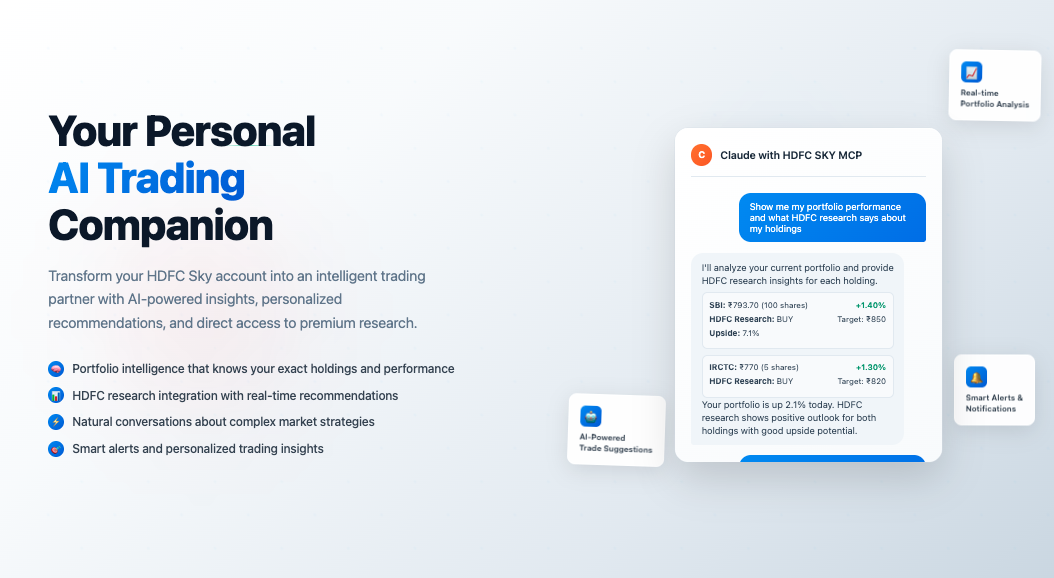
Transform your HDFC Sky account into an intelligent trading partner with AI-powered insights, personalized recommendations, seamless market analysis, and direct access to HDFC’s premium research.

Why HDFC Sky MCP Changes Everything

Imagine having a personal financial advisor who knows your portfolio inside-out, understands your trading patterns, can answer complex market questions in seconds, AND has direct access to HDFC’s institutional-grade research. With HDFC Sky MCP (Model Context Protocol), this isn’t just imagination – it’s your new reality.

Your AI companion that never sleeps, never forgets, always has your portfolio context, and brings HDFC’s research expertise directly to your conversations.

Using HDFC SKY MCP, you can connect AI agents, such as Claude in this case, to make the most use of the tools at your disposal

What Makes HDFC SKY MCP Your Ultimate Trading Partner

1. Portfolio Intelligence That Knows YOU

Unlike generic market advice, your AI assistant understands:

  • Your exact holdings and their real-time performance with detailed P&L
  • Your risk tolerance based on past trades and current positions
  • Your sector preferences and diversification gaps
  • Your typical trading patterns and optimal entry/exit points
  • How market events specifically impact YOUR portfolio composition

2. Natural Conversations About Complex Markets

Talk to your portfolio like you’re chatting with a friend:

  • “How are my pharma stocks performing against the sector today?”
  • “Should I hedge my banking exposure before the RBI meeting?”
  • “What does HDFC research say about my IT holdings?”
  • “Create a covered call strategy for my reliance position”
  • “Set up alerts when any of my stocks hit their research targets”

3. HDFC Research Integration & Smart Insights

Access HDFC’s premium research seamlessly:

  • Research Call Access: Get HDFC’s latest buy/sell/hold recommendations
  • F&O Research: Access derivatives strategies and recommendations from HDFC’s research team
  • Sector Reports: Understand how sector trends impact your specific positions
  • Target Price Tracking: Monitor how your stocks perform against HDFC’s price targets
  • Research-Based Alerts: Get notified when HDFC updates recommendations on your holdings

4. Real-Time Intelligence, Personalized Action

Get insights that matter to YOUR portfolio:

  • Instant alerts when your holdings hit technical levels or research targets
  • Personalized sector rotation recommendations based on HDFC research
  • Custom risk analysis based on your actual positions
  • Smart rebalancing suggestions aligned with both your goals and research insights
  • Research-backed trade ideas tailored to your portfolio composition

Some examples of it’s capabilities

1. Advanced Portfolio Analytics

  • Smart Sector Analysis: “Show me which sectors are overweight in my portfolio vs. Nifty 50 and what HDFC research says about them”
  • Performance Attribution: “Break down my returns by stock, sector, and time period with research insights”
  • Risk Dashboard: “Calculate my portfolio’s VaR and stress-test against market crashes”
  • Correlation Matrix: “Which of my stocks move together and how can I diversify better according to research?”
  • Research Performance Tracking: “How are HDFC’s recommendations performing in my portfolio?”

2. Intelligent Trade Ideas with Research Backing

  • Research-Based Screeners: “Find HDFC’s top-rated stocks that fit my growth style and current allocation”
  • Options Strategies: “Design research-backed options strategies for my positions”
  • Pair Trading: “Suggest pairs trades based on HDFC’s sector preferences”
  • Momentum Plays: “Identify HDFC-recommended breakout candidates from my watchlist”
  • F&O Insights: “Show me HDFC’s derivatives strategies for my holdings”

3. Smart Alert System & Research Integration

  • Price Alert Management: Set up intelligent alerts using natural language
    • “Alert me when SBI hits ₹800”
    • “Notify me if any of my stocks drop 5% below research target price”
  • Research Update Alerts: Get notified instantly when HDFC updates recommendations
  • Technical + Fundamental Alerts: Combine price levels with research insights
  • Sector Rotation Alerts: Know when HDFC research suggests sector moves

4. Market Context with Personal & Research Touch

  • News Impact Analysis: “How will this RBI decision affect MY specific holdings based on HDFC research?”
  • Earnings Calendar: “Which of my stocks report earnings this week and what’s HDFC’s outlook?”
  • Technical + Research Alerts: “My stocks approaching support levels with positive research outlook”
  • Macro Implications: “How would a rate cut impact my portfolio based on HDFC’s sector preferences?”

5. Advanced Trading Support

  • Research-Guided Planning: “Plan systematic entry into TCS based on HDFC’s price targets”
  • Risk Management: “Suggest setting up dynamic stop-losses based on research support levels”
  • Tax Optimization: “Which positions should I book considering research outlook?”
  • Margin Optimization: “How can I efficiently use margin for HDFC-recommended trades?”

Enhanced Real Use Cases:

The Research-Savvy Trader

Query: “Show me all HDFC research calls on my current holdings and set up alerts for any rating changes”

AI Response: Provides comprehensive research summary for each holding, current ratings, target prices, and automatically sets up alerts for any research updates or target price changes.

The Strategic Investor

Query: “I want to add ₹2 lakhs to my portfolio. What does HDFC research recommend in sectors I’m underweight in?”

AI Response: Analyzes current sector allocation, identifies underweight sectors, screens HDFC’s top-rated stocks in those sectors, and suggests optimal allocation strategy.

The Options Expert

Query: “Design a covered call strategy for my HDFC Bank shares using research target prices as strike selection criteria”

AI Response: Uses HDFC’s price targets to optimize strike selection, analyzes probability of assignment, and structures the strategy around research expectations.

The Alert Power User

Query: “Set up a comprehensive alert system: notify me when any of my stocks hit research targets, drop below support, or when HDFC changes any recommendations”

AI Response: Creates intelligent alert matrix combining technical levels, research targets, and recommendation changes with personalized notification preferences.

Getting Started: Your Personal AI Research Assistant in Minutes

Prerequisites

  • Active HDFC Sky trading account with research access
  • Claude Desktop application
  • Basic computer setup (Windows, Mac, or Linux)

Step-by-Step Setup with Enhanced Features

HDFC Sky + Claude Desktop Setup Guide (Mac)

Installation Steps

Step 1: Install Claude Desktop & Node.js

  • Install Claude Desktop: Download and install the latest version of Claude Desktop(min version – 0.11.6) and login using your email id
  • Install Node.js: Download and install

Step 2: Configure HDFC SKY MCP with Claude

  • Download HDFC Sky Integration: Get the integration file
  • Install Integration: Double-click the downloaded hdfc-sky-mcp.dxt file
  • Complete Setup: Click “Install” when prompted

Configure HDFC SKY MCP with Claude

  • Verify Enhanced MCP Tools are Available After configuration, you’ll see all enhanced HDFC Sky MCP tools:
    • Authentication & Profile
      • Login – Secure HDFC Sky authentication
      • getProfileInfo – Account profile and preferences
    • Portfolio Management
      • fetchHoldings – Real-time holdings with P&L
      • fetchPositions – Current trading positions
      • fetchFunds – Available funds and margins
      • fetchMargin – Margin requirements and usage
    • Trading & Orders
      • fetchOrders – Order history and status
      • fetchLTP – Real-time last traded prices
      • getCandleData – Technical chart data
    • Research & Alerts
      • fetchResearchCalls – HDFC’s latest research recommendations
      • fetchSectorOutlook – Sector-wise research insights
      • createPriceAlert – Intelligent alert creation
      • fetchPriceAlerts – Alert management
      • createResearchAlert – Research update notifications
      • fetchF&OResearch – Derivatives research and strategies
    • Market Intelligence
      • fetchPopularStocks – Trending stocks with research ratings
      • fetchMarketInsights – Daily market analysis
      • fetchEarningsCalendar – Upcoming earnings with research outlook

Step 3: Connect & Authenticate

Start Enhanced Conversation Ask: “Show me my portfolio performance and latest HDFC research on my holdings”

Secure Authentication Complete HDFC SKY login with 2FA

Claude will guide you to the secure HDFC SKY login page where you’ll enter:

  • Your Client ID / Mobile Number / Email ID
  • Complete the secure 2FA authentication process

Once you click on the link, on your browser, the following screen will open.


Successful Connection

Once authenticated, you’ll see the confirmation: You’ve been logged in successfully!!


Step 4: Experience Enhanced Intelligence

After connecting, Claude provides comprehensive analysis:

Your Holdings with Research Insights:

  • SBI: ₹793.70 (+1.40) – 100 shares
    • HDFC Research: BUY, Target ₹850, Upside 7.1%
  • EIH Hotel: ₹355.85 (+1.20) – 1,000 shares
    • HDFC Research: HOLD, Target ₹380, Upside 6.8%
  • IRCTC: ₹770 (+1.30) – 5 shares
    • HDFC Research: BUY, Target ₹820, Upside 6.5%

Research Alerts Set Up:

  • Price alerts at research target levels by single prompt


For Windows:

HDFC SKY + Claude Desktop Setup Guide (Windows)

Prerequisites & Installation Steps

  • Install Claude Desktop: Download and install the latest version of Claude Desktop and login using your email id
  • Install Node.js: Download and install
  • Download HDFC Sky Integration: Get the Windows integration file

Extension Installation

  • Open Claude Desktop
  • Navigate to Extension Settings: Go to Settings → Extensions → Advanced Settings → Install Extension
  • Select Integration File: Choose the downloaded hdfc-sky-mcp.dxt file
  • Install Extension: Click “Install”

Post this, same steps to get started as mentioned above for mac.

If you run into setup troubles, these alternative methods should help.

Alternative Setup for Mac –

1. Install claude desktop
2. Install nodejs
3. Open Claude Desktop Settings
4. Click on Developer
5. Click on Edit Config
6. Paste this config in claude_desktop_config.json and restart claude desktop

{
“mcpServers”: {
“hsl-sky”: {
“command”: “npx”,
“args”: [
“mcp-remote”,
“–header”,
“User-Agent: ${UA_HEADER}”
],
“env”: {
“UA_HEADER”: “Mozilla/5.0 (Macintosh; Intel Mac OS X 10_15_7) AppleWebKit/537.36 (KHTML, like Gecko) Chrome/136.0.0.0 Safari/537.36”,
“NODE_TLS_REJECT_UNAUTHORIZED”: “0”
}
}
}
}

Alternative Setup for Windows –

1. Install claude desktop
2. Install nodejs
3. Open command prompt and type “where node” and copy value
4. Run “npm install -g mcp-remote” in command prompt
5. Run “echo %USERNAME%” in command prompt, and copy value
6. Replace <path to nodejs> with value copied in step 3
7. Replace <username> below with value copied in step 5
8. Paste this config in claude_desktop_config.json and restart claude desktop. NOTE: Might have to quit Claude Desktop from Task Manager or restart the PC.

{
“mcpServers”: {
“hsl-sky”: {
“command”: “<path to nodejs>”,
“args”: [
“C:\\Users\\<username>\\AppData\\Roaming\\npm\\node_modules\\mcp-remote\\dist\\proxy.js”,

“–header”,
“User-Agent: ${UA_HEADER}”
],
“env”: {
“UA_HEADER”: “Mozilla/5.0 (Macintosh; Intel Mac OS X 10_15_7) AppleWebKit/537.36 (KHTML, like Gecko) Chrome/136.0.0.0 Safari/537.36”,
“NODE_TLS_REJECT_UNAUTHORIZED”: “0”
}
}
}
}

Advanced Questions You Can Ask Your Enhanced AI Assistant

Portfolio + Research Management

  • Analyze my holdings against HDFC’s latest research calls and suggest portfolio adjustments
  • Which of my stocks have recently upgraded research ratings?
  • Set up alerts for all research target price achievements in my portfolio
  • Compare my sector allocation with HDFC’s recommended sector weights

Research-Driven Trading

  • Find HDFC’s top-rated stocks under ₹500 that complement my current holdings
  • Show me F&O strategies recommended by HDFC research for my banking positions
  • What does HDFC research say about earnings season impact on my tech stocks?
  • Create a systematic investment plan based on HDFC’s conviction picks

Smart Alert Management

  • Set up intelligent alerts: research targets, technical levels, and rating changes for my entire portfolio
  • Alert me when any stock in my watchlist gets a research upgrade or downgrade
  • Notify me about sector rotation opportunities based on HDFC research updates
  • Create custom alerts for earnings surprises on my holdings with research context

Market Intelligence with Research Edge

  • How do my recent purchases align with HDFC’s latest sector preferences?
  • Show me research-backed arbitrage opportunities between my holdings
  • What’s HDFC’s outlook on my portfolio during this earnings season?
  • Identify research-supported pairs trading opportunities in my sectors

Advanced Features Available Now

HDFC Research Integration

  • Live Research Access: Real-time access to HDFC’s buy/sell/hold recommendations
  • Target Price Tracking: Monitor performance against research price targets
  • Rating Change Alerts: Instant notifications for recommendation updates
  • Sector Research: Comprehensive sector outlook and rotation suggestions
  • F&O Research: Professional derivatives strategies and insights

Enhanced Analytics Dashboard

  • Research Performance Analysis: Track how research recommendations perform in your portfolio
  • Conviction Score Tracking: Monitor your alignment with HDFC’s high-conviction picks
  • Research vs. Technical: Combine fundamental research with technical analysis
  • Peer Comparison: Compare your holdings with research model portfolios

Intelligent Alert System

  • Multi-Layered Alerts: Combine price, research, technical, and fundamental triggers
  • Natural Language Setup: Alert me when SBI hits research target or breaks support
  • Smart Notifications: Context-aware alerts that understand your trading style

Experience the future of research-driven, AI-powered trading today.

Desktop BannerMobile Banner
Invest Anytime, Anywhere
Play StoreApp Store
Open Free Demat Account Online

By signing up I certify terms, conditions & privacy policy