Nifty 50
- Kotak Mahindra Bank₹4408.10 (1.88%)
- Titan Company₹4,377-173.00 (-3.80%)
- BSE₹3,35651.00 (1.54%)
- Adani Enterprises₹2,743-106.90 (-3.75%)
- Bharti Airtel₹1,833.9023.40 (1.29%)
- Hindalco Industries₹910.85-29.65 (-3.15%)
- ICICI Bank₹1,357.5014.70 (1.09%)
- JSW Steel₹1,230-29.60 (-2.35%)
- Coal India₹414.502.85 (0.69%)
- Bharat Electronics₹378.30-9.10 (-2.35%)
- Max Healthcare₹9085.50 (0.61%)
- Infosys₹992-21.85 (-2.16%)
- HDFC Life Insurance ₹546.052.10 (0.39%)
- Asian Paints₹2,372.10-52.10 (-2.15%)
- Bajaj Finance₹963.850.75 (0.08%)
- Mahindra & Mahindra₹2,800-55.00 (-1.93%)
- Apollo Hospitals₹7,9172.50 (0.03%)
- Adani Ports₹1,750.10-33.30 (-1.87%)
- L&T₹3,701.50-68.50 (-1.82%)

- Offerings
- Tools & Platforms
Tools & Calculators
- Open API
- Calculators
- SIP Calculator
- CAGR Calculator
- Compound Interest Calculator
- FD Calculator
- RD Calculator
- EPF Calculator
- Retirement Calculator
- HDFC SIP Calculator
- Mutual Fund Return Calculator
- Lumpsum Calculator
- Step Up SIP Calculator
- ETF SIP Calculator
- Brokerage Calculator
- Equity Margin Calculator
- SWP Calculator
- EMI Calculator
- MTF Calculator
- Margin Pledge Calculator
- Algo Strategy
- Markets
Stocks
F&O
Mutual Funds
- More
KART - Your Gateway to Basket Orders in the Stock Market!
By Peter Cutinho | Updated at: Jun 19, 2025 05:12 PM IST
Open Free Demat Account
Open Free Demat Account
What is KART?
KART is a groundbreaking feature on HDFC SKY trading application, SKY, that allows traders to place multiple orders in a single go. Instead of executing each trade individually, you can now buy or sell a group of stocks simultaneously with just one tap.
Why Use Basket Orders?
The benefits of using KART for your trading needs are manifold:
- Time-Saving: Placing individual orders for each stock can be time-consuming. With KART, you can add up to 20 orders across options, futures, and equity segments, and execute them all in one swift move.
- Ease of Use: The user-friendly interface of HDFC Securities’ trading app ensures that even beginners in the stock market can easily use the KART feature without any hassle.
- Margin-Effective: The best part is, Kart helps traders to get Margin benefit and there are no additional charges for using the KART feature.
Key Features of KART:
- Create Multiple Karts: You have the freedom to create up to 20 Karts, each comprising a mix of equity and derivative scripts.
- F&O Strategies Made Easy: Execute your complex F&O strategies using KART orders with a single tap and avail margin benefits.
- Order Status and Retry: After execution, you can check the status of your KART orders in the orders section. If any orders fail, you can retry executing them without any hassles.
Understanding the Two Types of Kart Orders:
- Normal Kart: In this type of KART order, all the added stocks will be placed in the market simultaneously, without any time interval or holding between two orders.
- Hedge Kart: The Hedge Kart is designed specifically for Hedge-based F&O trades to provide margin benefits. Usually, hedge orders in options reduce the margin requirement to 1/4th of the original margin. However, brokers typically offer this benefit only if you place the BUY Option trade first and it gets executed before placing the SELL Option order. But with our Hedge Kart, you get this benefit even if you place the SELL order first. We send all orders as a market order in Hedge Kart, ensuring your orders are executed with the minimum margin required.
So, whether you are a beginner in the stock market or an experienced trader, KART is the ultimate feature that streamlines your trading experience and helps you execute multiple orders effortlessly.
Discovery of Kart:
- Go to Sky App > Orders
- Tap on
Kart
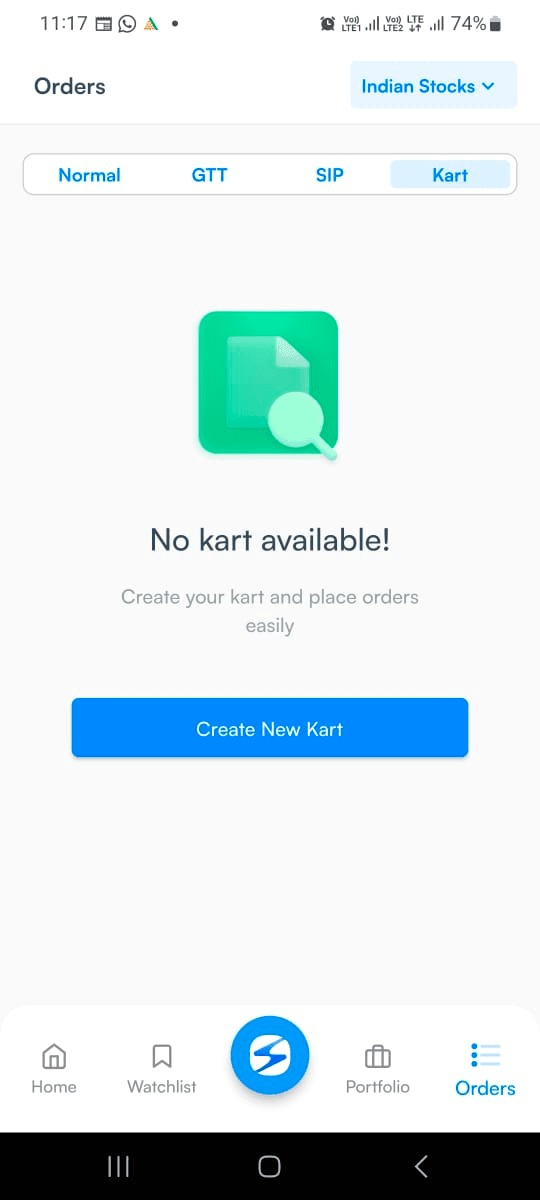
- Tap on
Create Kart
and
Name your Kart
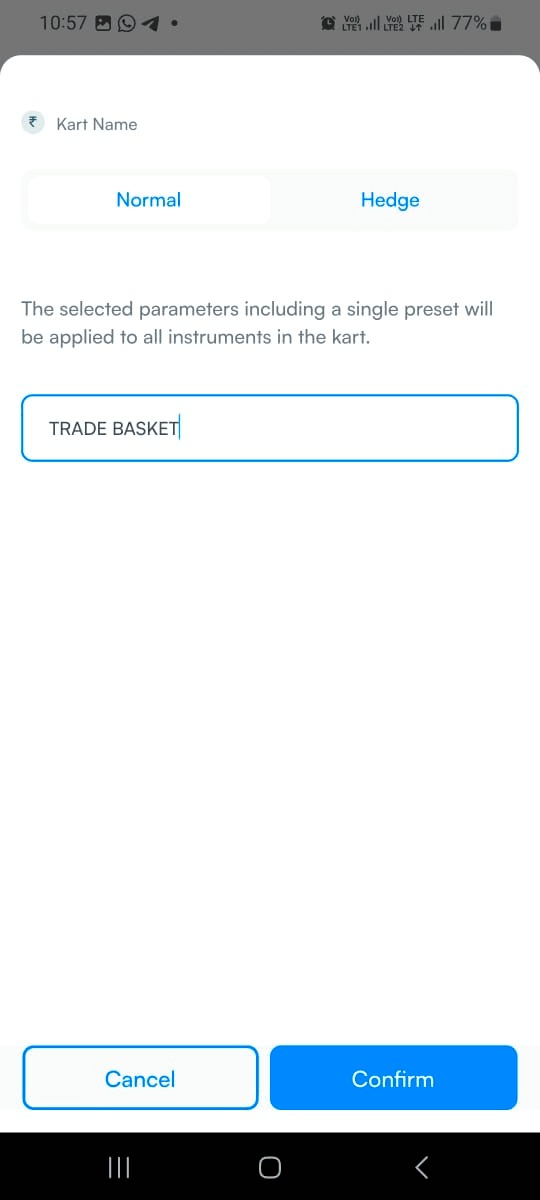
-
Add stocks
to your Kart
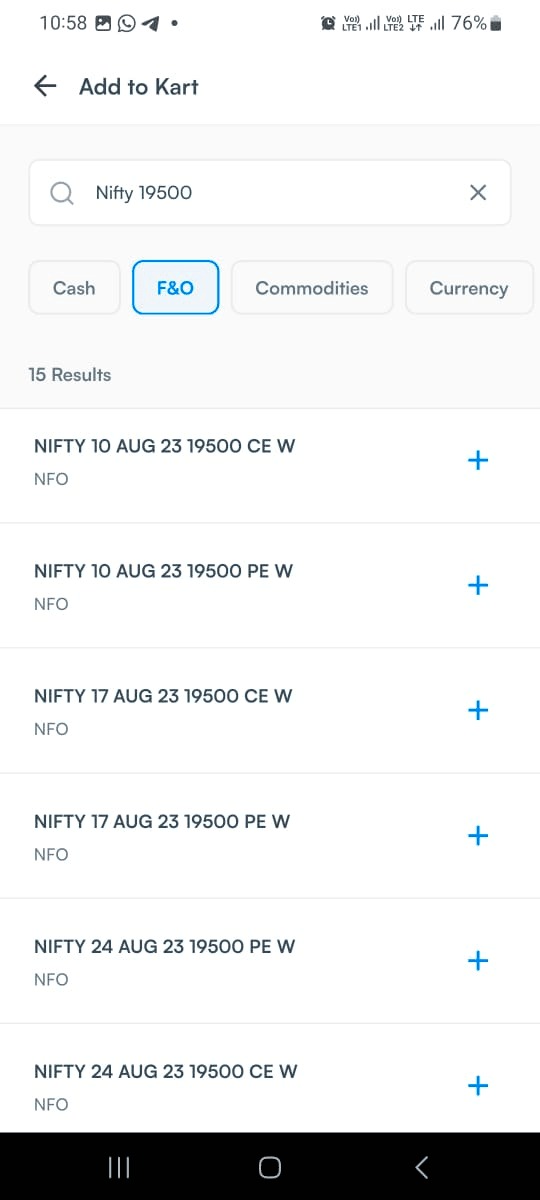
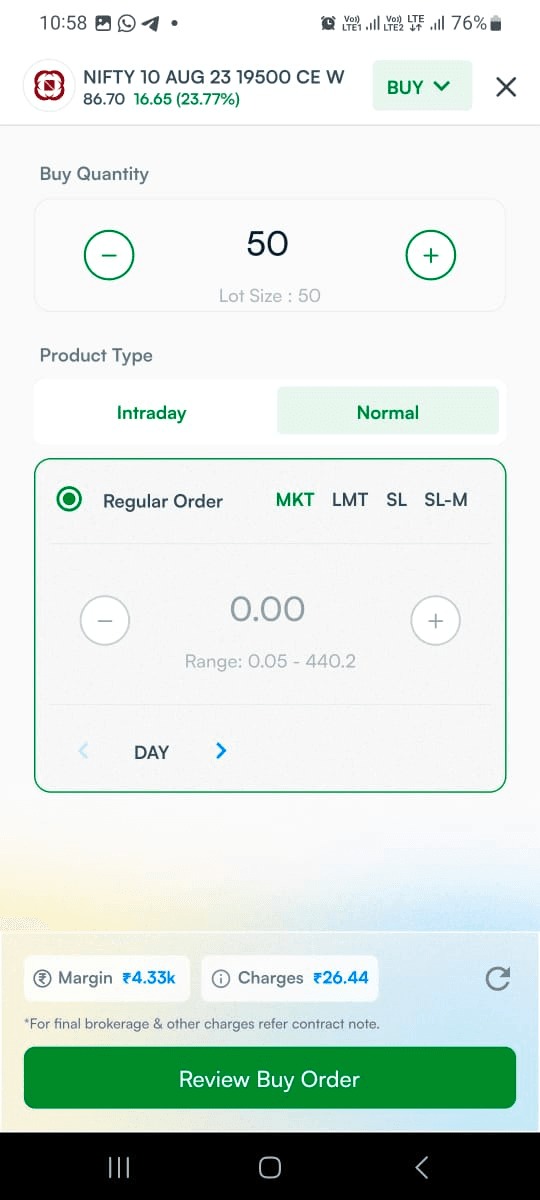
- Fill the required details for the order like Quantity, Product type, Order type etc and click on Review Order
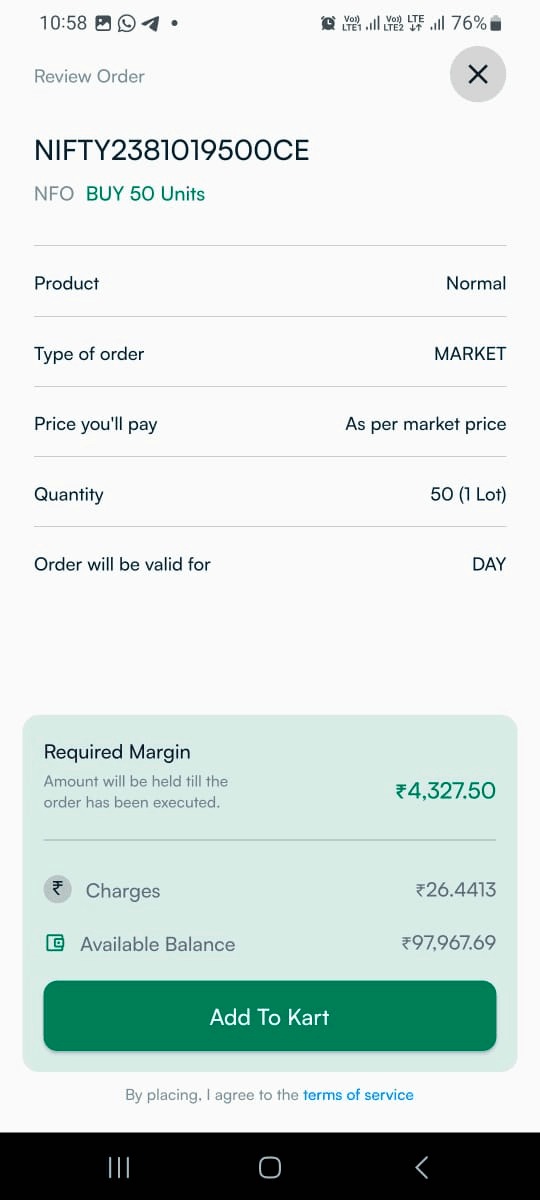
- After review the order click on
Add to Kart
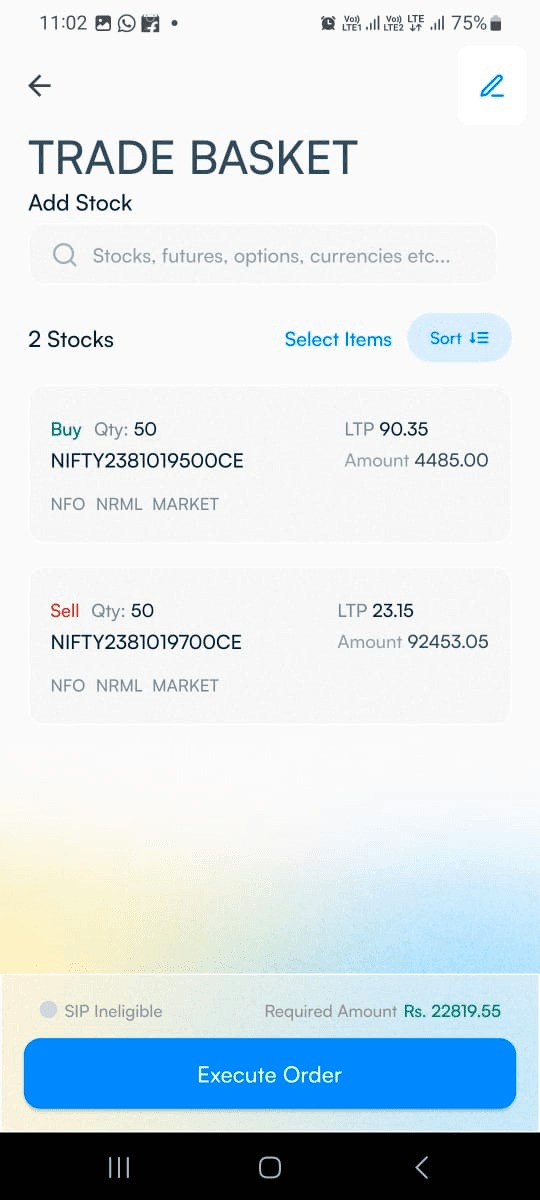
- After adding multiple stocks click on Execute Order.
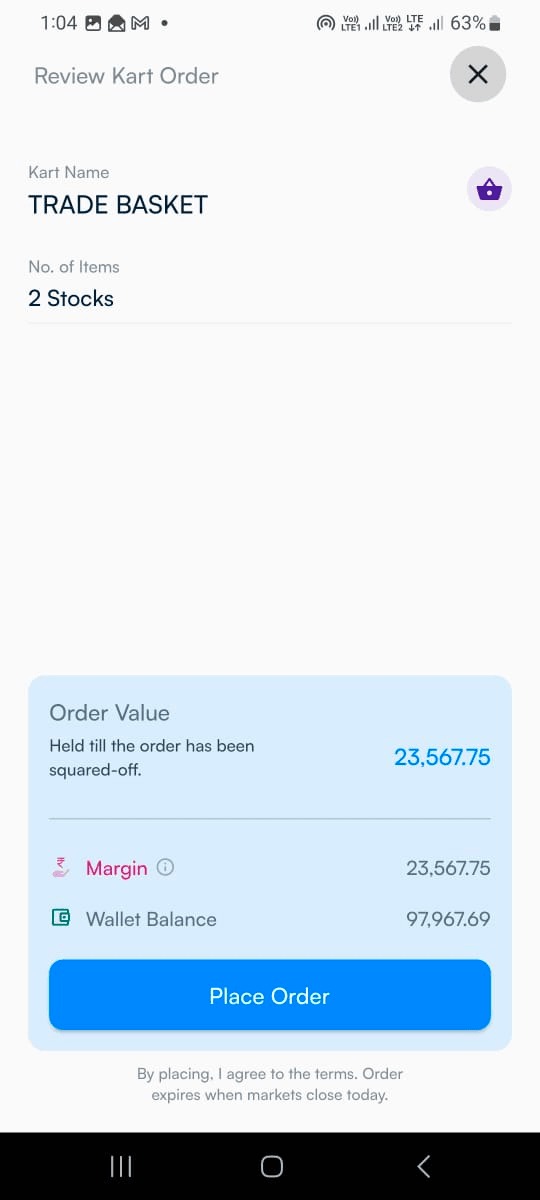
- Review the required margin for your basket and click on
Place Order
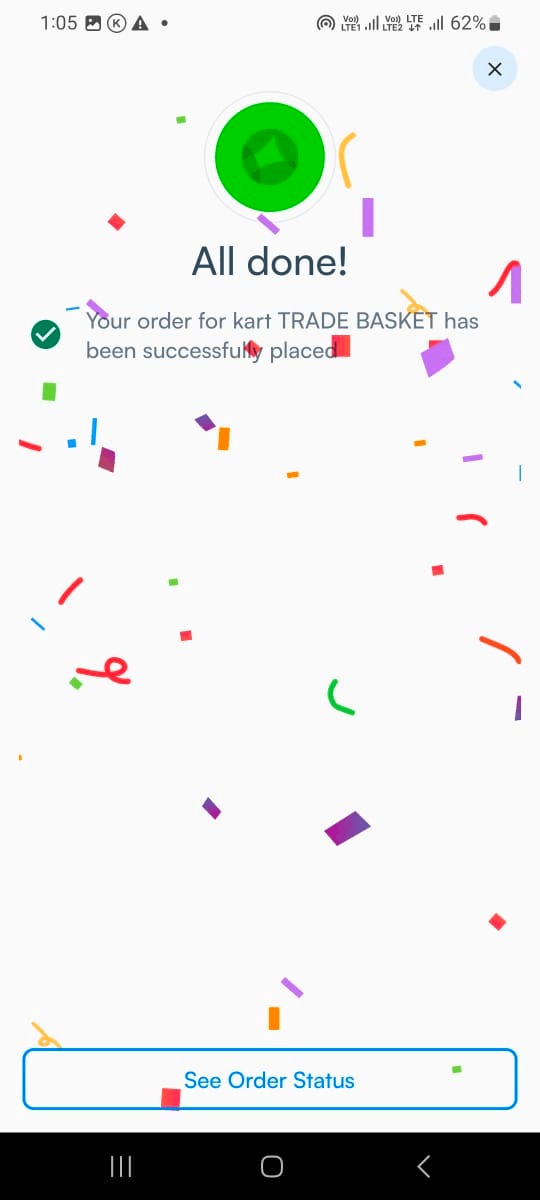
- All Done!! Get status of all your kart order from the Orders section
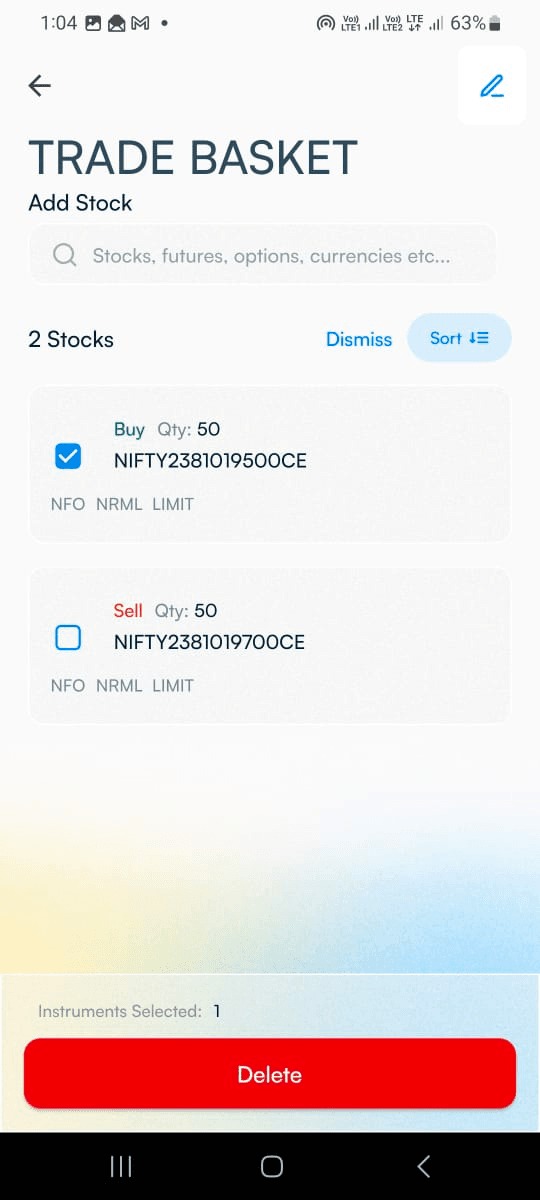
- You can delete added stocks by selecting choice of stock and also you can sort the stocks as per your preference.
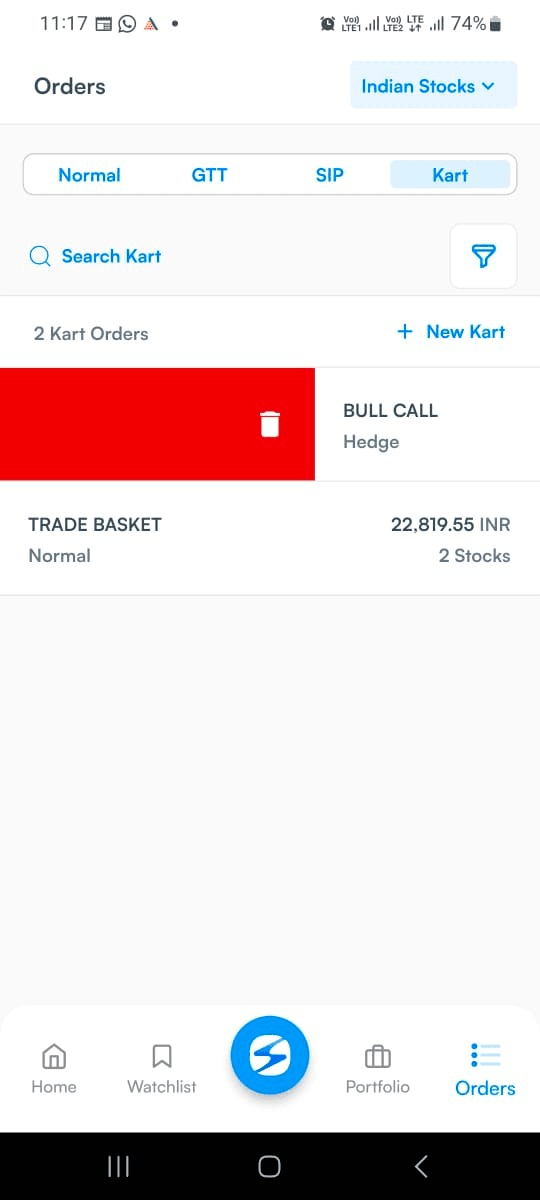
- You can delete the entire Kart by right or left swiping.
Meanwhile, we would be delighted to hear about your firsthand experience with the KART feature. Your feedback is invaluable to us, and we eagerly await any suggestions you may have to enhance and elevate your trading journey with HDFC SKY.
Feel free to share your thoughts with us, as we are committed to continuously improving our services for you. Happy trading!
Try KART on HDFC SKY trading app today and witness the power of Basket Orders firsthand! Happy Trading!


FAQs
How do I place normal order on HDFC SKY?
How do I place currency/commodity order on HDFC Sky?
How to pledge your shares on HDFC SKY?
How to Unpledge your shares on HDFC SKY?
About Author

Peter Cutinho
Open Free Demat Account
Open Free Demat Account
Popular Posts
- 10 Interesting Facts About NSE You Probably Didn’t KnowLast Updated: Sep 30, 2026
- 8-4-3 Rule of SIP - How Does That Work?Last Updated: Jul 30, 2025
- Let's view more exciting Post!
Popular Post from Share Market
- New Pre‑Open Rules Go Live on 7 September 2026Last Updated: Sep 4, 2026
- Trap Alert: How to Identify Common Market TrapsLast Updated: Apr 24, 2026
- When the King of Skies Encounters TurbulenceLast Updated: Jan 28, 2026
- HDFC Securities Partners with smallcase to Launch Model Portfolios on HDFC SKYLast Updated: Nov 28, 2025
- HDFC Securities Introduces SKY Signals on HDFC SKY to Strengthen Research-Driven Investments for Retail CustomersLast Updated: Nov 20, 2025
- Let's view more exciting Post!
Popular Post from Blogs
- “Bounce Back” Theme Gains Traction in 2026Last Updated: Apr 8, 2026
- 5 Takeaways for Tax Payers from the Budget 2025Last Updated: Jan 29, 2026
- Let’s view more exciting Posts

Invest Anytime, Anywhere


By signing up I certify terms, conditions & privacy policy