Nifty 50
- Bajaj Finance₹1,07076.00 (7.65%)
- Apollo Hospitals₹8,371-228.50 (-2.66%)
- Shriram Finance₹96455.25 (6.08%)
- ONGC₹230-5.00 (-2.13%)
- Mahindra & Mahindra₹3,127.50165.60 (5.59%)
- NTPC₹316.70-5.25 (-1.63%)
- Maruti Suzuki₹12,652657.00 (5.48%)
- Coal India₹394.30-5.35 (-1.34%)
- Tata Motors PV₹293.7015.20 (5.46%)
- Adani Ports₹1,884.60-25.40 (-1.33%)
- InterGlobe Aviation₹5,420279.20 (5.43%)
- Bharat Electronics₹395.10-2.90 (-0.73%)
- ICICI Bank₹1,50075.90 (5.33%)
- Dr. Reddy's Labs₹1,366-8.00 (-0.58%)
- BSE₹3,790188.50 (5.23%)
- Bharti Airtel₹2,056.90-10.70 (-0.52%)
- Bajaj Finserv₹1,83578.50 (4.47%)
- ITC₹278.85-1.15 (-0.41%)
- Asian Paints₹2,523.80105.50 (4.36%)
- Power Grid Corp₹261.15-0.90 (-0.34%)

- Offerings
- Tools & Platforms
Tools & Calculators
- Open API
- Calculators
- SIP Calculator
- CAGR Calculator
- Compound Interest Calculator
- FD Calculator
- RD Calculator
- EPF Calculator
- Retirement Calculator
- HDFC SIP Calculator
- Mutual Fund Return Calculator
- Lumpsum Calculator
- Step Up SIP Calculator
- ETF SIP Calculator
- Brokerage Calculator
- Equity Margin Calculator
- SWP Calculator
- EMI Calculator
- MTF Calculator
- Margin Pledge Calculator
- Algo Strategy
- Markets
Stocks
F&O
Mutual Funds
- More
Basket Orders via HDFC SKY Open API-A Guide to Multi-Leg Order Execution
By HDFC SKY | Published at: Nov 5, 2026 05:00 PM IST
Open Free Demat Account
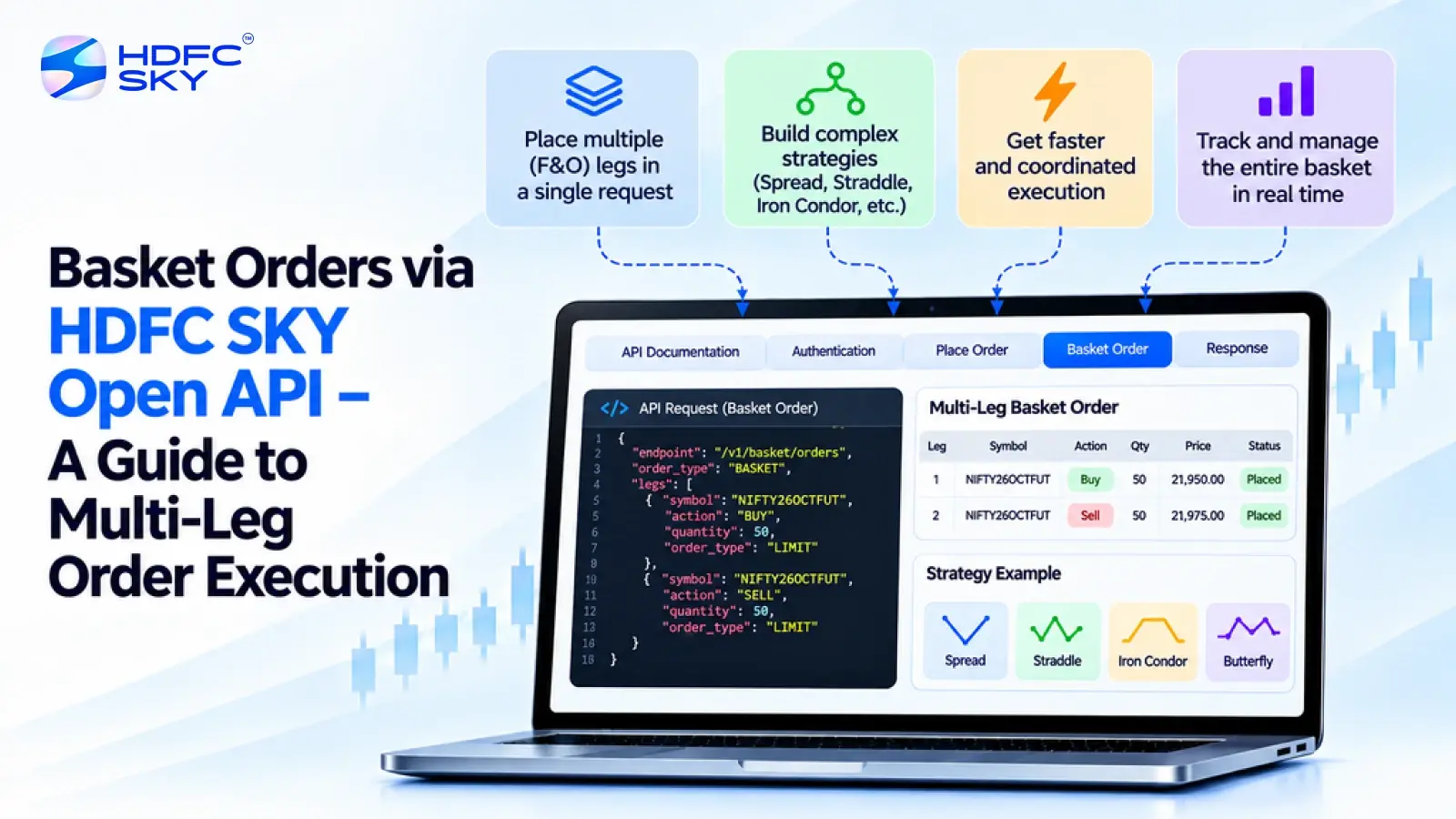
Basket orders help traders place multiple buy and sell orders together instead of submitting each order separately. This feature is especially useful when executing strategies involving several stocks or derivative contracts. The HDFC SKY Open API enables developers to automate basket order execution by integrating trading applications with its APIs. This guide explains how basket orders work, how to construct a multi-leg basket, and the steps involved in monitoring order execution through the HDFC SKY Open API.
What are Basket Orders?
A basket order is a collection of multiple individual orders that are submitted together as a single logical group. Instead of placing each order manually, traders can create a basket containing several orders and send them through one request.
Each order within the basket is known as a leg. Every leg contains its own trading details, such as the instrument, transaction type, quantity, and order type.
Basket orders are commonly used for equity and derivatives trading where multiple positions need to be executed as part of the same trading strategy.
What Is an Order Leg?
Before creating a basket order, it is helpful to understand what an order leg represents.
An order leg is an individual buy or sell order within a basket. Each leg contains its own trading details, such as the exchange, trading symbol or instrument token, transaction type, quantity, order type, and product type.
A basket order groups multiple order legs into a single request, while each leg continues to be processed and tracked individually after submission.
Before understanding the API workflow, it helps to know why traders use basket orders.
Why Use Basket Orders?
Basket orders offer several practical advantages.
Some common benefits include:
- Placing multiple orders together.
- Saving time during order placement.
- Reducing manual data entry.
- Supporting multi-leg trading strategies.
- Managing several positions through a single workflow.
- Improving automation in trading applications.
Although basket orders simplify order placement, each leg is processed individually by the order management system.
Understanding Multi-Leg Orders
A multi-leg basket consists of two or more related orders grouped into a single basket. For example, a basket may include:
- Buying one instrument.
- Selling another instrument.
- Placing multiple equity orders.
- Executing several futures or options contracts.
Each leg retains its own order details even though all the legs belong to the same basket.
Also Read: Tracking Open Interest (OI) Programmatically with the HDFC SKY Open API
Building a Multi-Leg Basket
Before creating a basket, retrieve the latest instrument details using the Security Master API. This helps ensure that your application uses valid instrument tokens and current contract specifications for the securities you want to trade.
Once authentication is complete, the next step is to create the basket request. The HDFC SKY Open API allows developers to group multiple order legs into a single basket request for programmatic execution.
The number of order legs supported depends on the API specifications and any applicable system limits. Before building your application, refer to the latest HDFC SKY Developer Portal documentation to understand the supported basket size and any implementation requirements.
Each order leg should contain the required parameters so that the API can process the request correctly.
- Exchange
Specify the exchange for each order leg based on the instrument you want to trade. Examples include:
I. NSE
II. BSE
III. MCX
The exchange should match the trading instrument and the values supported by the relevant HDFC SKY API endpoint. - Trading Symbol or Instrument Token
Identify the instrument using the trading symbol or the instrument token, as required by the relevant HDFC SKY API endpoint. - Transaction Type
Specify whether the order is:
I. BUY
II. SELL - Quantity
Enter the quantity to trade.
Depending on the instrument, this may represent shares or lots. - Order Type
Select the order type for each leg.
Common order types include:
I. MARKET
II. LIMIT - Product Type
Specify the product category for the order.
Common examples include:
I. CNC
II. NRML
III. MIS
Each order leg should contain complete and accurate information before the basket is submitted.
Basket Order Execution Workflow
The execution process follows a series of simple steps.
- Create the Basket Request
Prepare the basket by combining all the required order legs into a single request payload. - Send the Basket Order Request
Submit the basket using a POST request to the appropriate basket order endpoint described in the HDFC SKY API documentation.
After the request is received, the HDFC SKY order management system processes the individual order legs and returns a response for the processed orders. - Receive the API Response
After processing the request, the API returns a response containing individual order reference IDs for the processed order legs.
These reference IDs allow developers to monitor the execution status of each order separately through the Order Book or other supported APIs and services - Monitor Order Status
After submission, monitor each order using the Order Book or the real-time WebSocket updates available through the HDFC SKY Open API.
Monitoring helps you confirm successful executions and identify any rejected or pending order legs. - Understanding Individual Order Execution
Although multiple orders are submitted together as part of a basket, each order leg is tracked individually after the request is processed.
As a result, the execution status may vary across different order legs. For example:
I. One order may be executed successfully.
II. Another order may remain pending.
III. A different order may be rejected because of exchange or validation requirements.
For this reason, developers should monitor the execution status of every order leg instead of assuming that the entire basket has been completed successfully.
Best Practices for Basket Order Execution
Following a few best practices can improve the reliability of your application.
- Validate Instrument Details
Retrieve the latest instrument information before creating the basket. - Verify Order Parameters
Check the exchange, trading symbol, quantity, order type, and product type before submitting the request. - Handle API Responses
Process the API response carefully and record the reference ID for every order leg. - Monitor Every Order Leg
Track each order separately through the Order Book or WebSocket updates. - Handle Failed Orders
Your application should identify rejected or failed orders and respond appropriately instead of assuming that every order has been executed successfully.
Common Applications of Basket Orders
Basket orders support many trading and investment workflows.
Some common use cases include:
- Multi-leg options strategies.
- Equity portfolio execution.
- Futures trading.
- Algorithmic trading.
- Automated portfolio rebalancing.
- Trading applications.
- Investment management platforms.
Developers can use basket orders to automate the execution of multiple related trades while maintaining independent tracking for each order.
Conclusion
The HDFC SKY Open API makes it easier to execute basket orders programmatically by allowing developers to group multiple order legs into a single workflow. By completing authentication, retrieving valid instrument details, creating a structured basket, and monitoring each order individually, developers can build reliable trading applications. Always refer to the HDFC SKY Developer Portal for the latest API specifications, supported features, and implementation guidelines before integrating your application.



Open Free Demat Account
Popular Posts
- 10 Interesting Facts About NSE You Probably Didn’t KnowLast Updated: Sep 30, 2026
- 8-4-3 Rule of SIP - How Does That Work?Last Updated: Jul 30, 2025
- Let's view more exciting Post!
Popular Post from Blogs
- “Bounce Back” Theme Gains Traction in 2026Last Updated: Apr 8, 2026
- 5 Takeaways for Tax Payers from the Budget 2025Last Updated: Jan 29, 2026
- Let’s view more exciting Posts


Invest Anytime, Anywhere


By signing up I certify terms, conditions & privacy policy