Nifty 50
- Bajaj Finance₹1,07076.00 (7.65%)
- Apollo Hospitals₹8,371-228.50 (-2.66%)
- Shriram Finance₹96455.25 (6.08%)
- ONGC₹230-5.00 (-2.13%)
- Mahindra & Mahindra₹3,127.50165.60 (5.59%)
- NTPC₹316.70-5.25 (-1.63%)
- Maruti Suzuki₹12,652657.00 (5.48%)
- Coal India₹394.30-5.35 (-1.34%)
- Tata Motors PV₹293.7015.20 (5.46%)
- Adani Ports₹1,884.60-25.40 (-1.33%)
- InterGlobe Aviation₹5,420279.20 (5.43%)
- Bharat Electronics₹395.10-2.90 (-0.73%)
- ICICI Bank₹1,50075.90 (5.33%)
- Dr. Reddy's Labs₹1,366-8.00 (-0.58%)
- BSE₹3,790188.50 (5.23%)
- Bharti Airtel₹2,056.90-10.70 (-0.52%)
- Bajaj Finserv₹1,83578.50 (4.47%)
- ITC₹278.85-1.15 (-0.41%)
- Asian Paints₹2,523.80105.50 (4.36%)
- Power Grid Corp₹261.15-0.90 (-0.34%)

- Offerings
- Tools & Platforms
Tools & Calculators
- Open API
- Calculators
- SIP Calculator
- CAGR Calculator
- Compound Interest Calculator
- FD Calculator
- RD Calculator
- EPF Calculator
- Retirement Calculator
- HDFC SIP Calculator
- Mutual Fund Return Calculator
- Lumpsum Calculator
- Step Up SIP Calculator
- ETF SIP Calculator
- Brokerage Calculator
- Equity Margin Calculator
- SWP Calculator
- EMI Calculator
- MTF Calculator
- Margin Pledge Calculator
- Algo Strategy
- Markets
Stocks
F&O
Mutual Funds
- More
- What Is Semi-Automated Trading?
- How the Integration Works
- Why Is a Bridge Platform Required?
- How a Bridge Connects TradingView and HDFC SKY
- Common Bridge Platforms
- Setting Up the Bridge Platform
- Configuring TradingView Alerts
- Order Execution Workflow
- Best Practices for Semi-Automated Trading
- Common Applications of This Integration
- Conclusion
- What Is Semi-Automated Trading?
- How the Integration Works
- Why Is a Bridge Platform Required?
- How a Bridge Connects TradingView and HDFC SKY
- Common Bridge Platforms
- Setting Up the Bridge Platform
- Configuring TradingView Alerts
- Order Execution Workflow
- Best Practices for Semi-Automated Trading
- Common Applications of This Integration
- Conclusion
Connecting HDFC SKY to TradingView Alerts for Semi-Automated Trading
By HDFC SKY | Published at: Nov 5, 2026 05:15 PM IST
Open Free Demat Account
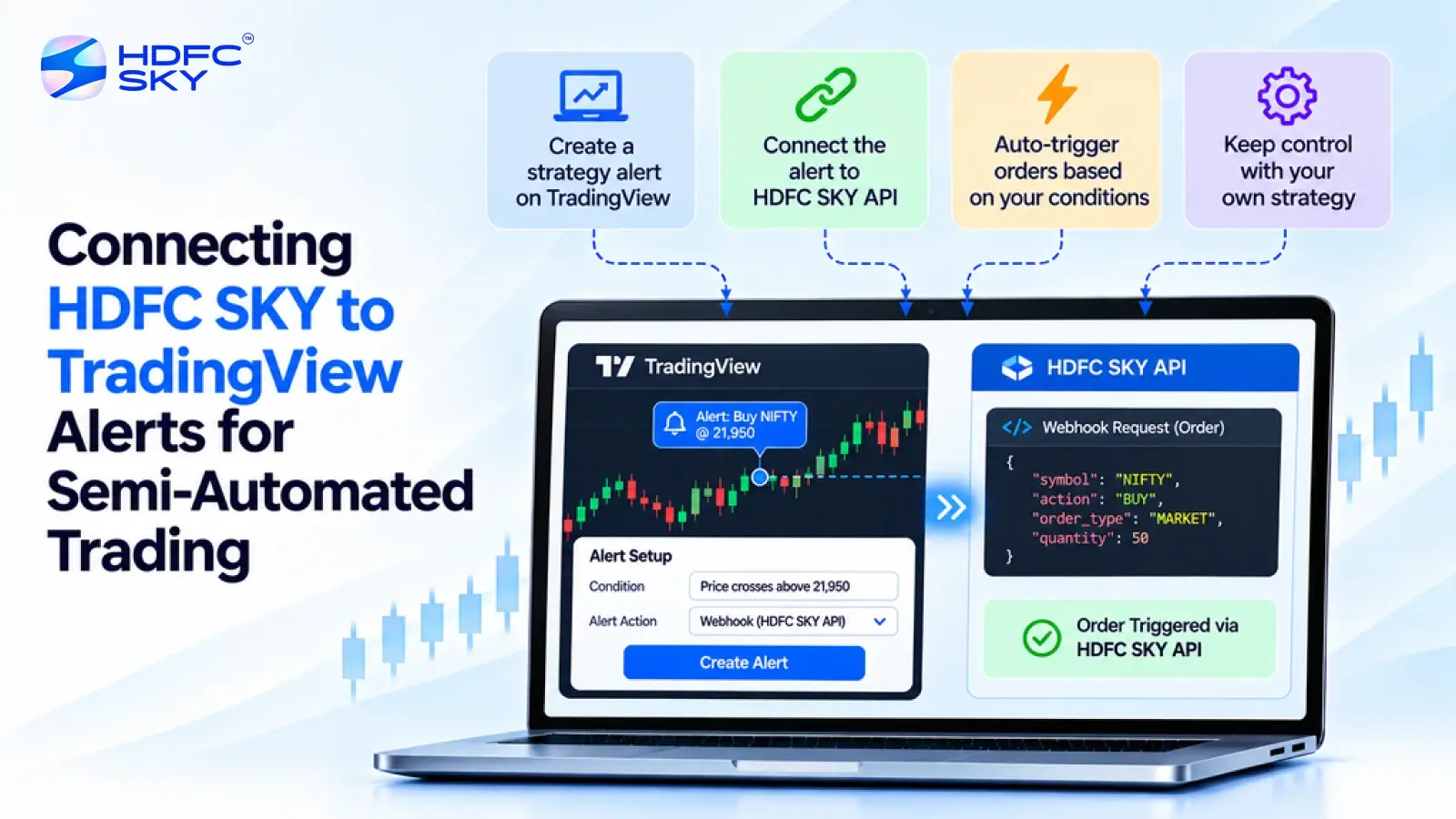
TradingView is a popular charting platform that allows traders to create price alerts and strategy-based notifications. Many traders use these alerts to reduce manual monitoring and respond more quickly to market movements. HDFC SKY provides a TradingView-powered charting interface for manual chart-based trading. However, it does not currently provide a native webhook endpoint for directly receiving TradingView alerts. Developers who want to automate order routing can use a compatible bridge platform together with the HDFC SKY Open API.
This guide explains the complete setup process.
What Is Semi-Automated Trading?
Semi-automated trading combines automated trade signals with manual oversight. Instead of placing every order manually, traders use predefined conditions to generate alerts. These alerts are then passed to a trading platform, where they can be converted into order requests through an integration layer.
Unlike fully automated trading, semi-automated trading still allows traders to monitor their strategies and manage risk throughout the trading session.
Before connecting TradingView to HDFC SKY, it helps to understand how the integration works.
How the Integration Works
The overall workflow is straightforward.
- A trading strategy or indicator generates an alert in TradingView.
- The alert is sent to a bridge or middleware platform through a webhook.
- The bridge validates and processes the alert message before converting it into an API request.
- The bridge sends the corresponding order request to the HDFC SKY Open API.
- After successful authentication and validation, the request is forwarded for order processing according to the authenticated user’s account and the submitted order parameters.
This approach enables semi-automated trading while keeping TradingView and HDFC SKY connected through an intermediary application.
Why Is a Bridge Platform Required?
HDFC SKY provides a TradingView-powered charting interface for manual chart trading. However, it does not currently offer a native webhook endpoint that can receive TradingView alerts directly.
For this reason, a bridge or middleware platform is required to receive TradingView webhook alerts and convert them into API requests that the HDFC SKY Open API can process.
Also Read: Placing MTF Orders Through the HDFC SKY Open API-A Complete Guide to the Pledge Flow
How a Bridge Connects TradingView and HDFC SKY
A bridge platform acts as the communication layer between TradingView and the HDFC SKY Open API.
When TradingView generates an alert, it sends the alert to the bridge through a webhook. The bridge validates the message, converts it into the required API request, and forwards it to the HDFC SKY Open API for order processing.
Without this intermediary, TradingView alerts cannot directly place orders through the HDFC SKY Open API because HDFC SKY does not currently provide a native webhook receiver.
Common Bridge Platforms
Several third-party bridge platforms can be used for this integration. Common examples include OpenAlgo and Algomojo. These platforms receive TradingView webhook alerts, convert them into API requests, and forward them to the HDFC SKY Open API for processing.
These bridge platforms act as intermediaries between TradingView and the HDFC SKY Open API. Before using any third-party software, review its documentation, security features, and compatibility with the latest HDFC SKY APIs.
Setting Up the Bridge Platform
Once your API credentials are ready, configure the bridge application.
- Install or Configure the Bridge
Install the selected bridge platform locally or on a virtual private server (VPS), depending on the software you choose. - Enter the API Credentials
Configure the bridge by entering your HDFC SKY API credentials according to the bridge platform’s setup instructions. - Retrieve the Webhook URL
After the bridge is configured, it provides the webhook URL that TradingView uses to send alert notifications. The exact setup depends on the bridge platform you choose. TradingView sends alerts to this URL whenever the selected alert conditions are met. - Review the Supported Alert Format
Each bridge platform defines the JSON or text message format required to process trading instructions.
Review the bridge documentation carefully before creating your TradingView alerts.
Configuring TradingView Alerts
Once the bridge is running, configure TradingView to send alerts.
Open the Required Chart
Open the chart for the instrument that you want to monitor. Webhook alerts are available only on TradingView plans that support webhook notifications. Before configuring alerts, verify that your TradingView subscription includes this feature.
Create a New Alert
Create an alert using your preferred indicator, drawing tool, or Pine Script strategy. Choose an appropriate trigger condition based on your trading strategy.
Enter the Webhook URL
Paste the webhook URL generated by your bridge platform into the Webhook URL field while creating the alert. This allows TradingView to send alert notifications to the bridge.
Configure the Alert Message
Enter the JSON or text message required by your bridge platform. Depending on the connector, the message may include details such as:
- Trading symbol
- Buy or sell action
- Quantity
- Order type
The exact message structure depends on the bridge platform you are using.
Order Execution Workflow
Once the setup is complete, the order execution process follows a simple sequence.
- TradingView generates an alert.
- The alert is sent to the bridge through the webhook.
- The bridge validates the alert message.
- The bridge converts the alert into an HDFC SKY Open API request.
- The bridge submits the order request to the HDFC SKY Open API. If the request passes validation and authentication, it is forwarded for order processing.
- The application can monitor the order status through the HDFC SKY Order Book or other supported APIs and services.
Best Practices for Semi-Automated Trading
Following a few best practices can improve reliability and reduce operational issues.
- Test Before Live Trading
Always test the complete workflow before placing live orders. - Protect Your API Credentials
Store your API Key and API Secret securely and never expose them publicly. - Validate Alert Messages
Ensure that every TradingView alert follows the message format required by the selected bridge platform. - Monitor Order Status
After an alert triggers an order, monitor the execution status using the HDFC SKY Order Book or other supported APIs. - Keep Software Updated
Regularly update your bridge platform and review the latest HDFC SKY API documentation to ensure compatibility with new features and changes.
Common Applications of This Integration
Connecting TradingView with the HDFC SKY Open API supports a wide range of trading applications.
Some common use cases include:
- Strategy-based trading.
- Indicator-driven trade execution.
- Portfolio monitoring.
- Alert-based order placement.
- Semi-automated trading workflows.
- Algorithmic trading research.
Developers can customise the workflow according to their trading strategy while maintaining manual oversight of the trading process.
Conclusion
Connecting TradingView to the HDFC SKY Open API for semi-automated trading requires a compatible bridge platform because HDFC SKY does not currently support direct TradingView webhook integration. By configuring a bridge, authenticating with the HDFC SKY Open API, and creating properly formatted TradingView alerts, developers can automate order routing while retaining control over their trading decisions. Always refer to the latest HDFC SKY Developer Portal and your bridge platform’s documentation before implementing the integration.



Open Free Demat Account
Popular Posts
- 10 Interesting Facts About NSE You Probably Didn’t KnowLast Updated: Sep 30, 2026
- 8-4-3 Rule of SIP - How Does That Work?Last Updated: Jul 30, 2025
- Let's view more exciting Post!
Popular Post from Blogs
- “Bounce Back” Theme Gains Traction in 2026Last Updated: Apr 8, 2026
- 5 Takeaways for Tax Payers from the Budget 2025Last Updated: Jan 29, 2026
- Let’s view more exciting Posts
Invest Anytime, Anywhere


By signing up I certify terms, conditions & privacy policy