Nifty 50
- Bajaj Finance₹942.1016.10 (1.74%)
- HDFC Life Insurance ₹522.05-17.60 (-3.26%)
- ICICI Bank₹1,395.9010.90 (0.79%)
- Nestle₹1,185.20-38.70 (-3.16%)
- Bajaj Auto₹10,15078.00 (0.77%)
- Eternal₹304.55-7.80 (-2.50%)
- Sun Pharmaceutical₹1,75812.90 (0.74%)
- Tata Motors PV₹269.35-6.35 (-2.30%)
- SBI₹9707.00 (0.73%)
- Tech Mahindra₹1,800-34.70 (-1.89%)
- UltraTech Cement₹10,91869.00 (0.64%)
- HDFC Bank₹693.70-13.25 (-1.87%)
- L&T₹3,655.1019.10 (0.53%)
- Adani Enterprises₹2,547-47.50 (-1.83%)
- BSE₹3,264.9016.60 (0.51%)
- Trent₹2,771-51.00 (-1.81%)
- Cipla₹1,320.606.60 (0.50%)
- Hindustan Unilever₹1,817.60-32.60 (-1.76%)
- Apollo Hospitals₹7,62626.00 (0.34%)
- Bharat Electronics₹364.95-6.25 (-1.68%)

- Offerings
- Tools & Platforms
Tools & Calculators
- Open API
- Calculators
- SIP Calculator
- CAGR Calculator
- Compound Interest Calculator
- FD Calculator
- RD Calculator
- EPF Calculator
- Retirement Calculator
- HDFC SIP Calculator
- Mutual Fund Return Calculator
- Lumpsum Calculator
- Step Up SIP Calculator
- ETF SIP Calculator
- Brokerage Calculator
- Equity Margin Calculator
- SWP Calculator
- EMI Calculator
- MTF Calculator
- Margin Pledge Calculator
- Algo Strategy
- Markets
Stocks
F&O
Mutual Funds
- More
- What TradingView on HDFC SKY Brings Together
- How to Get Started with TradingView Charts on HDFC SKY
- Place Orders Directly from the HDFC SKY TradingView Chart
- Modify Orders Visually Without Leaving the Chart
- Track Orders and Positions in Real Time
- Charting Tools That Support the Trading Workflow
- Why Trade Directly from Charts on HDFC SKY?
- Conclusion
- What TradingView on HDFC SKY Brings Together
- How to Get Started with TradingView Charts on HDFC SKY
- Place Orders Directly from the HDFC SKY TradingView Chart
- Modify Orders Visually Without Leaving the Chart
- Track Orders and Positions in Real Time
- Charting Tools That Support the Trading Workflow
- Why Trade Directly from Charts on HDFC SKY?
- Conclusion
Trade Directly from Charts on HDFC SKY: Place, Modify, and Track Orders Without Leaving the Chart
By HDFC SKY | Published at: Oct 22, 2026 03:07 PM IST
Open Free Demat Account
Open Free Demat Account
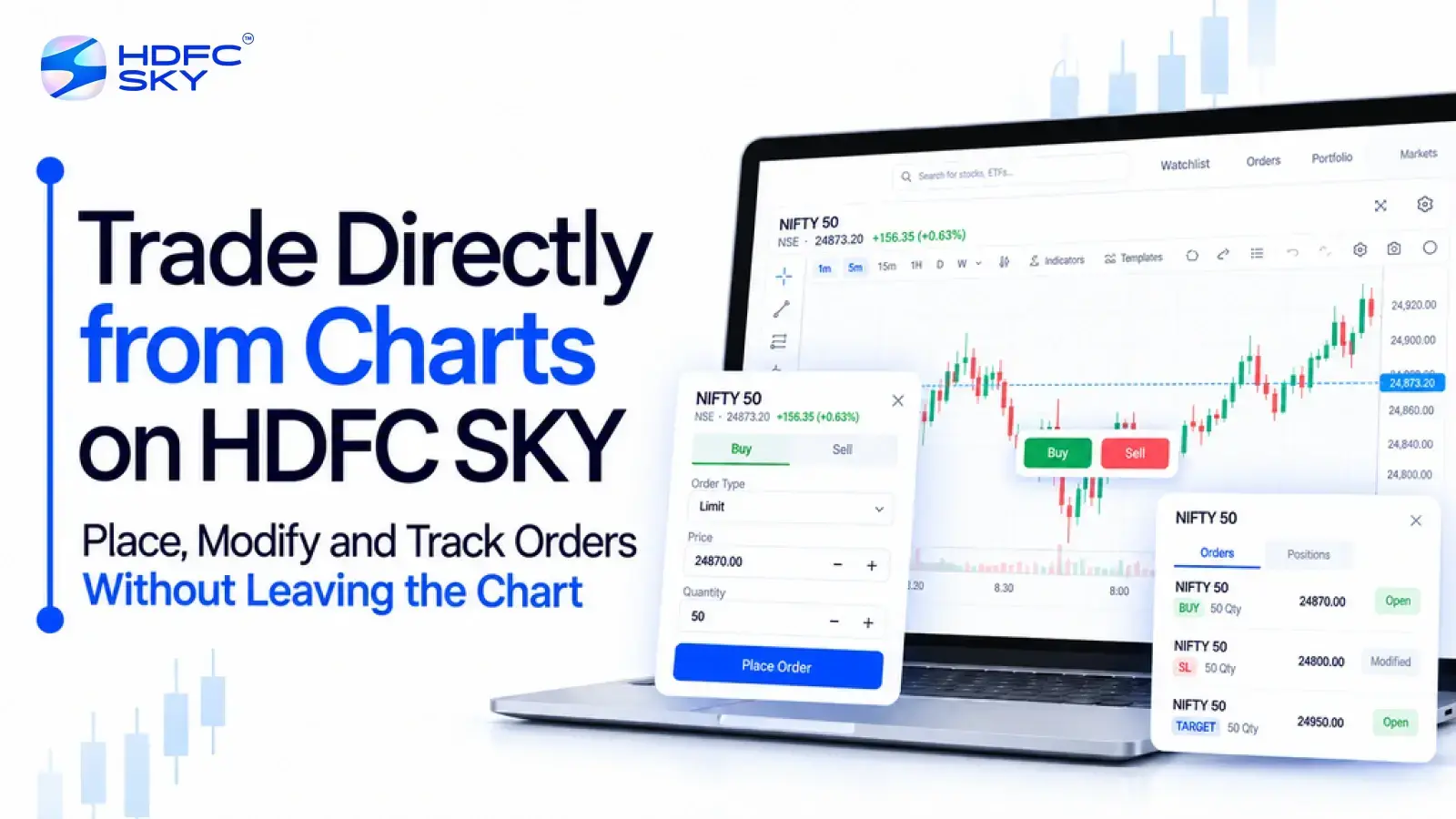
Chart analysis often forms the starting point for a trade. However, moving between a chart and a separate order screen can interrupt the process. HDFC SKY brings charting and trading together through its TradingView integration. You can analyse price movements, place orders, modify them, and track positions from the same trading environment. This setup helps keep market analysis and order management connected without requiring you to switch between separate platforms.
What TradingView on HDFC SKY Brings Together
HDFC SKY integrates TradingView charts into its trading platform, giving users another charting option alongside ChartIQ. The integration combines chart-based analysis with trading features in one place.
The TradingView interface on HDFC SKY includes tools for analysing price movements and managing trades. HDFC SKY highlights real-time chart trading, multiple layouts, technical indicators, saved studies, drag-and-drop trading, and real-time positions and orders.
This means the chart does more than show price movements. It also becomes part of the order management process. That makes the next step straightforward: use the chart to study the market before placing a trade.
How to Get Started with TradingView Charts on HDFC SKY
Before placing any order, you can use the HDFC SKY TradingView chart to study the instrument and its price movement. The platform supports different chart types, time frames, indicators, and drawing tools.
1. Choose the Instrument and Chart
Start by selecting the stock, index, or other instrument you want to analyse. You can then open its chart and adjust the view based on your trading approach.
HDFC SKY’s TradingView integration supports chart types such as candlestick, bar, line, and Heikin-Ashi charts. You can also navigate to specific dates and time frames when reviewing price history.
2. Use Indicators and Drawing Tools
You can add technical indicators and drawing tools to the chart to study price movements. HDFC SKY also allows users to save indicator and study setups for easier access later.
The aim is to keep the analysis stage within the same chart where you can later manage the trade. Once you have formed your trading view, you can move directly to order placement.
Place Orders Directly from the HDFC SKY TradingView Chart
HDFC SKY allows users to execute trades directly from the TradingView interface hosted on its platform. This connects the decision-making process with order execution on the same chart.
The platform supports trading in equities and F&O on NSE and BSE, as well as commodities on MCX through its TradingView environment.
1. Start the Order from the Chart
Once you have analysed the price action, you can initiate a buy or sell order directly from the chart. You do not need to leave the TradingView interface to begin the order process.
2. Enter the Required Order Details
Enter the relevant order details, such as the quantity and price-related information required for the selected order. Review the details before submitting the order. This helps you confirm that the order matches your intended trade.
3. Place the Order
After reviewing the details, submit the order through the HDFC SKY interface. The order then becomes part of your active order flow, which you can monitor as the market moves.
Placing the order from the chart completes the first stage of the workflow.
Modify Orders Visually Without Leaving the Chart
HDFC SKY supports drag-and-drop trading through its TradingView integration. This feature allows users to place or modify trades directly on the chart. Instead of treating an order as something separate from the chart, you can manage it in relation to the price movement you are watching.
1. Adjust Order Levels on the Chart
The drag-and-drop feature lets you interact with order levels directly on the chart. You can adjust the relevant level by moving it within the chart interface. This gives you a visual way to manage an existing order as your trading view changes.
2 .Keep the Order and Price Action Together
When you modify an order from the chart, you can see the order level alongside the price movement. This keeps the change connected to the market context you are analysing.
The key benefit is continuity. You can analyse the chart and manage the related order without moving to a separate trading screen.
Once an order is placed or modified, the next requirement is knowing what happens to it. That brings order tracking into the same workflow.
Track Orders and Positions in Real Time
HDFC SKY’s TradingView integration includes real-time positions and orders. This allows you to keep track of your trading activity while continuing to work with the chart.
The broader HDFC SKY order system also provides an Order Book where users can track their orders and view details such as the asset, action, and order information.
1. Monitor Your Orders
You can keep an eye on orders after submitting them. This helps you understand the current status of your trading activity.
2. View Your Positions
Once an order results in a position, you can monitor that position as part of your trading workflow. HDFC SKY highlights real-time position visibility within its TradingView integration.
3. Keep Tracking Connected to Analysis
The value of chart-based trading does not stop when you place an order. You can continue watching the chart while keeping track of your orders and positions. This completes the main workflow: analyse the chart, place the order, modify it when required, and track the result.
Charting Tools That Support the Trading Workflow
The trading workflow becomes more useful when the chart gives you enough flexibility to study the market in the way you prefer. HDFC SKY’s TradingView integration provides several tools for this purpose.
The main charting capabilities include:
- Multiple layouts: View and work with multiple charts and market views.
- Multiple chart types: Use formats such as candlestick, bar, line, and Heikin-Ashi charts.
- Technical indicators: Add multiple indicators to support your market analysis.
- Drawing tools: Mark relevant levels and patterns directly on the chart.
- Saved studies: Save indicator and study setups for repeated use.
- Full-screen charts: Expand charts for a more focused analysis view.
These tools support the analysis that comes before and during a trade. They do not replace the need to assess a trade carefully. Instead, they keep the analysis and trading process within one connected environment.
Why Trade Directly from Charts on HDFC SKY?
Chart-based trading can make the trading workflow more connected. Instead of separating analysis, execution, and monitoring, HDFC SKY brings these activities into its TradingView environment.
The main practical advantages include:
- Less screen switching: You can analyse and trade from the same chart environment.
- Visual order management: Drag-and-drop functionality lets you interact with orders on the chart.
- Real-time visibility: You can monitor orders and positions as part of the trading workflow.
- Flexible analysis: Indicators, drawing tools, chart types, and layouts support different analysis preferences.
- Multiple market segments: HDFC SKY supports equities and F&O on NSE and BSE, along with commodities on MCX through its TradingView environment.
The result is a more connected process from market analysis to trade management. The next step is simply accessing the TradingView environment on HDFC SKY.
Conclusion
HDFC SKY’s TradingView integration connects chart analysis with order execution and monitoring. You can analyse price movements, place trades, modify orders, and track positions from one environment. With indicators, drawing tools, multiple layouts, and drag-and-drop trading, the platform keeps the trading process connected. This can make chart-based order management simpler for traders who prefer to work from the chart itself.



Open Free Demat Account
Open Free Demat Account
Popular Posts
- 10 Interesting Facts About NSE You Probably Didn’t KnowLast Updated: Sep 30, 2026
- 8-4-3 Rule of SIP - How Does That Work?Last Updated: Jul 30, 2025
- Let's view more exciting Post!
Popular Post from Derivatives
- How to Set Up Scalper Mode on Web for Nifty & Bank Nifty OptionsLast Updated: Oct 22, 2026
- Scalper Mode Now on HDFC SKY Web: One-Click Trading for Fast MarketsLast Updated: Oct 22, 2026
- Automated F&O Market Nudges on HDFC SKY: Daily Signals Delivered to YouLast Updated: Oct 22, 2026
- How to Execute an Iron Condor or Straddle from the Option Chain Basket on HDFC SKYLast Updated: Oct 22, 2026
- Option Chain Basket Orders on the HDFC Sky App: Build Multi-Leg Strategies in One GoLast Updated: Oct 22, 2026
- Let's view more exciting Post!
Popular Post from Blogs
- “Bounce Back” Theme Gains Traction in 2026Last Updated: Apr 8, 2026
- 5 Takeaways for Tax Payers from the Budget 2025Last Updated: Jan 29, 2026
- Let’s view more exciting Posts

Invest Anytime, Anywhere


By signing up I certify terms, conditions & privacy policy