Nifty 50
- Adani Ports₹1,870.10108.80 (6.18%)
- Trent₹2,865.20-48.70 (-1.67%)
- Adani Enterprises₹2,621.90142.10 (5.73%)
- SBI Life Insurance ₹1,644.50-22.20 (-1.33%)
- Kotak Mahindra Bank₹45919.00 (4.32%)
- Asian Paints₹2,256.60-28.00 (-1.23%)
- Power Grid Corp₹261.4510.05 (4.00%)
- Maruti Suzuki₹11,441-138.00 (-1.19%)
- Eternal₹338.7512.75 (3.91%)
- Bajaj Auto₹10,368-117.00 (-1.12%)
- NTPC₹312.208.45 (2.78%)
- Hindalco Industries₹886.70-7.05 (-0.79%)
- Bajaj Finance₹940.8023.55 (2.57%)
- Tech Mahindra₹1,767.60-9.00 (-0.51%)
- ITC₹265.856.35 (2.45%)
- Eicher Motors₹7,270-30.00 (-0.41%)
- Titan Company₹4,442104.10 (2.40%)
- HCL Technologies₹1,395.30-5.20 (-0.37%)
- Hindustan Unilever₹1,855.9040.10 (2.21%)
- Cipla₹1,364-1.60 (-0.12%)

- Offerings
- Tools & Platforms
Tools & Calculators
- Open API
- Calculators
- SIP Calculator
- CAGR Calculator
- Compound Interest Calculator
- FD Calculator
- RD Calculator
- EPF Calculator
- Retirement Calculator
- HDFC SIP Calculator
- Mutual Fund Return Calculator
- Lumpsum Calculator
- Step Up SIP Calculator
- ETF SIP Calculator
- Brokerage Calculator
- Equity Margin Calculator
- SWP Calculator
- EMI Calculator
- MTF Calculator
- Margin Pledge Calculator
- Algo Strategy
- Markets
Stocks
F&O
Mutual Funds
- More
- What Is the New F&O Details Page on HDFC SKY?
- How to Access the F&O Details Page on HDFC SKY
- Futures Tab Explained
- Options Tab Explained
- How the Option Chain Fits Into the F&O Details Page
- What Should You Check on the F&O Details Page?
- How the New F&O Details Page Makes Contract Discovery Easier
- F&O Details Page and Other HDFC SKY F&O Tools
- A Simple Example of Using the F&O Details Page
- Conclusion
- What Is the New F&O Details Page on HDFC SKY?
- How to Access the F&O Details Page on HDFC SKY
- Futures Tab Explained
- Options Tab Explained
- How the Option Chain Fits Into the F&O Details Page
- What Should You Check on the F&O Details Page?
- How the New F&O Details Page Makes Contract Discovery Easier
- F&O Details Page and Other HDFC SKY F&O Tools
- A Simple Example of Using the F&O Details Page
- Conclusion
The F&O Details Page on HDFC SKY: Futures & Options Tabs Explained
By HDFC SKY | Published at: Oct 29, 2026 12:24 PM IST
Open Free Demat Account
Open Free Demat Account
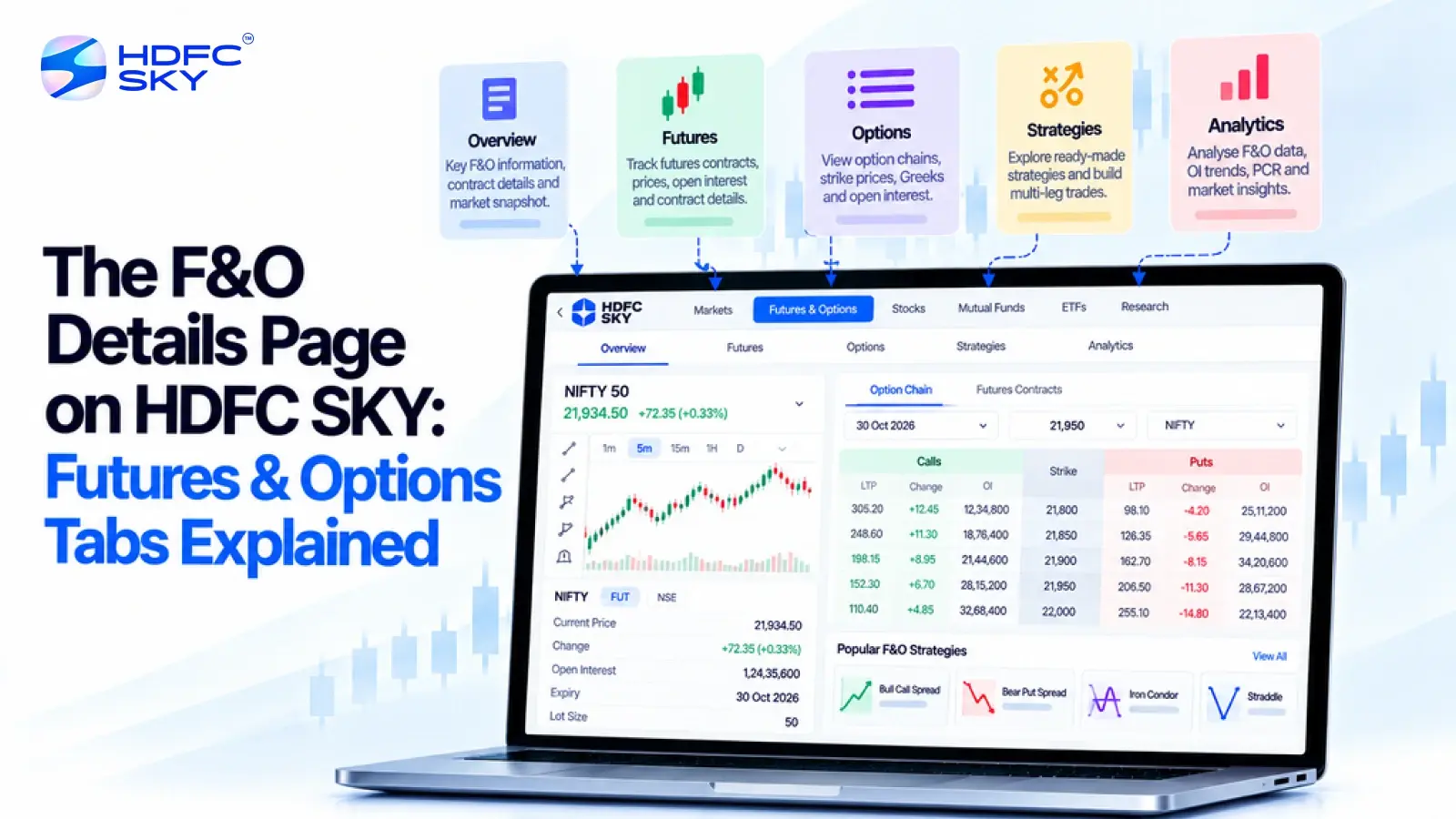
Futures and options can involve several contracts, expiry dates, and price details. Finding the right information quickly can make the process easier. The new F&O Details Page on HDFC SKY brings futures and options information closer to the security you want to explore. You can switch between the Futures and Options tabs to view relevant contract details. This guide explains how the page works and how you can use it to explore F&O contracts.
What Is the New F&O Details Page on HDFC SKY?
The F&O Details Page gives you a focused view of futures and options linked to a selected stock or index. To access it, search for the security you want to explore, open its details page, and select the Futures and Options section. You can then switch between the Futures and Options tabs to view the relevant contract information.
You can also select See Option Chain to explore available options in greater detail. This makes it easier to move from the underlying security to its related derivatives in one place.
How to Access the F&O Details Page on HDFC SKY
You can reach the F&O information directly from the security details page. Follow these steps to get started.
1. Search for the stock or index
Start from the Home Screen and use the search bar. Enter the name of the stock or index you want to check. Select the required security from the search results.
2. Open the security details page
Once you select the security, its details page opens. You can view the available market information from this page.
3. Select Futures and Options
Look for the Futures and Options option on the details page. Select it to view the relevant F&O information.
4. Choose the relevant tab
You can now move between the Futures and Options tabs. Select Futures when you want to explore futures contracts. Select Options when you want to explore options contracts. This keeps the two contract types separate and makes the information easier to follow.
Futures Tab Explained
The Futures tab focuses on futures contracts linked to the selected security. It gives you a direct view of available futures contracts and their market information. Here are the key details you can look at.
1. Futures Price
The Futures tab shows the price of the futures contract. You can use this information to see how the selected futures contract is trading. The price can change during market hours. Always check the latest available price before making a decision.
2. Expiry
Every futures contract has an expiry date. The Futures view shows the relevant expiry for each contract. You may find futures contracts across different expiry periods. Checking the expiry helps you identify the exact contract you are viewing.
3. Price Across Expiry
You can compare futures prices across different expiry periods. This gives you a broader view of how the futures contracts are priced. HDFC SKY’s futures pages also display information such as LTP, expiry, days for expiry, open interest, traded volume, and changes in open interest for available futures contracts.
4. Open Interest and Traded Volume
Open interest shows the number of outstanding contracts in the market. Traded volume shows the number of contracts traded during a period. These figures can help you understand the level of activity around a futures contract.
Options Tab Explained
The Options tab focuses on options contracts linked to the selected security. You can use it to explore different option contracts and then move to the option chain for a wider view.
Here are the main details to understand.
1. Option Price
The Options view lets you check the price of an option contract. The price can change as market conditions change. Check the latest available price when reviewing a contract.
2. Strike Price
Every option has a strike price. It represents the price level specified in the option contract. You may see several strike prices for the same underlying security. Each strike represents a different option contract.
3. Call and Put Options
Options come in two basic types: Call and Put.
A Call gives the buyer the right to buy the underlying asset at the specified strike price, subject to the contract terms. A Put gives the buyer the right to sell it at the specified strike price. The Options view helps you identify the relevant option contracts.
4. Expiry
Options also have an expiry date. When you compare different options, check both the strike price and expiry. These two details help you identify the specific contract you are reviewing.
How the Option Chain Fits Into the F&O Details Page
The Options tab gives you a starting point for exploring option contracts. You can go deeper through the option chain. Select See Option Chain to view the available option contracts across different strike prices and expiry periods.
The option chain brings Call and Put information together. It also provides several data points that can help you review individual contracts.
1. Compare Different Strike Prices
The option chain lets you view multiple strike prices on one screen. This makes it easier to compare different option contracts for the same underlying security.
2. Check Open Interest
You can view open interest for different strikes. You can also see changes in open interest. This can help you understand how activity around different contracts is changing.
3. Track Option Prices
The option chain displays option premiums and changes in premiums. This lets you track price movements across different strikes.
4. Explore Different Expiry Periods
You can select the relevant expiry and review the available contracts for that period. This helps you focus on the contracts that match the expiry you want to study.
Also Read: Option Chain Basket Orders on the HDFC Sky App: Build Multi-Leg Strategies in One Go
What Should You Check on the F&O Details Page?
A few basic checks can help you understand the contract you are viewing. Keep the following points in mind:
- Underlying security: Check the stock or index linked to the contract.
- Contract type: Confirm whether you are viewing Futures or Options.
- Expiry: Check the contract’s expiry date.
- Price: Review the latest available futures price or option price.
- Strike price: Check the strike when you review an option.
- Call or Put: Confirm the type of option contract.
- Open interest: Review open interest where it is available.
- Traded volume: Check the traded volume where available.
- Change in open interest: Review the change when you want to understand how open interest has moved.
These details can help you understand exactly which contract you are reviewing.
How the New F&O Details Page Makes Contract Discovery Easier
The F&O market can have several contracts for the same stock or index. The F&O Details Page gives you a clear starting point. Search for the security you want to explore and open its F&O information.
The separate Futures and Options tabs make navigation easier. You can view futures contracts in one place and switch to Options when you want to explore option contracts.
You can also select See Option Chain to compare available option contracts in greater detail. This lets you move between the relevant views based on the information you need.
F&O Details Page and Other HDFC SKY F&O Tools
The F&O Details Page is part of the wider F&O experience on HDFC SKY. You can also use tools such as the Advanced Option & Future Chain, Open Interest Analysis, F&O Dashboard, Market Movers & Scanners, Payoff Analyser, and Auto Order Slicer.
Each tool serves a different purpose. The F&O Details Page helps you start with a specific security and explore its contracts. Other tools can help you review market activity, compare contracts, or evaluate a strategy.
Together, these features let you start with a security, review its F&O details and access additional tools when you need a deeper view.
A Simple Example of Using the F&O Details Page
Suppose you want to explore the F&O contracts for a particular stock. Start by searching for the stock from the Home Screen. Select the stock from the search results and open its details page.
Next, select Futures and Options. If you want to review futures, select the Futures tab. Check the available contract prices and expiry details.
If you want to review options, select the Options tab. Check the available option information, including the strike price and expiry.
You can then select See Option Chain if you want to compare multiple option contracts. The option chain lets you view information such as option prices, open interest and changes in open interest across different strikes.
This approach keeps the process simple. You start with the security and then move to the contract type you want to explore.
Conclusion
The new F&O Details Page on HDFC SKY gives you a simple way to explore futures and options from a security’s details page. The Futures and Options tabs keep the two contract types separate and easy to navigate. You can also move to the option chain when you need a wider view of available options and related market data.



Open Free Demat Account
Open Free Demat Account
Popular Posts
- 10 Interesting Facts About NSE You Probably Didn’t KnowLast Updated: Sep 30, 2026
- 8-4-3 Rule of SIP - How Does That Work?Last Updated: Jul 30, 2025
- Let's view more exciting Post!
Popular Post from Derivatives
- Curated Algo Strategies on HDFC SKY: How to Read Strategy Performance Before You SubscribeLast Updated: Oct 29, 2026
- How to Deploy Your First Algo Strategy on HDFC SKY via AlgoBulls: A Step-by-Step GuideLast Updated: Oct 29, 2026
- Options Tab Walkthrough on HDFC SKY: IV, OI, and Max Pain at a GlanceLast Updated: Oct 29, 2026
- Futures Tab Walkthrough on HDFC SKY: Where to Find Basis, Rollover, and OI DataLast Updated: Oct 29, 2026
- How to Set Up Scalper Mode on Web for Nifty & Bank Nifty OptionsLast Updated: Oct 22, 2026
- Let's view more exciting Post!
Popular Post from Blogs
- “Bounce Back” Theme Gains Traction in 2026Last Updated: Apr 8, 2026
- 5 Takeaways for Tax Payers from the Budget 2025Last Updated: Jan 29, 2026
- Let’s view more exciting Posts
Invest Anytime, Anywhere


By signing up I certify terms, conditions & privacy policy