Nifty 50
- Adani Ports₹1,862.90101.60 (5.77%)
- Trent₹2,869.10-44.80 (-1.54%)
- Adani Enterprises₹2,621141.20 (5.69%)
- Maruti Suzuki₹11,443-136.00 (-1.17%)
- Power Grid Corp₹262.1010.70 (4.26%)
- SBI Life Insurance ₹1,649.60-17.10 (-1.03%)
- Kotak Mahindra Bank₹458.3018.30 (4.16%)
- Bajaj Auto₹10,390-95.00 (-0.91%)
- Eternal₹337.3511.35 (3.48%)
- Cipla₹1,357.80-7.80 (-0.57%)
- Hindustan Unilever₹1,86549.20 (2.71%)
- Hindalco Industries₹889.85-3.90 (-0.44%)
- Bajaj Finance₹94224.75 (2.70%)
- Tech Mahindra₹1,768.90-7.70 (-0.43%)
- NTPC₹311.157.40 (2.44%)
- Eicher Motors₹7,269-31.00 (-0.42%)
- Titan Company₹4,437.6099.70 (2.30%)
- Tata Steel₹169-0.27 (-0.16%)
- Tata Consumer ₹1,02221.80 (2.18%)
- InterGlobe Aviation₹4,685-5.00 (-0.11%)

- Offerings
- Tools & Platforms
Tools & Calculators
- Open API
- Calculators
- SIP Calculator
- CAGR Calculator
- Compound Interest Calculator
- FD Calculator
- RD Calculator
- EPF Calculator
- Retirement Calculator
- HDFC SIP Calculator
- Mutual Fund Return Calculator
- Lumpsum Calculator
- Step Up SIP Calculator
- ETF SIP Calculator
- Brokerage Calculator
- Equity Margin Calculator
- SWP Calculator
- EMI Calculator
- MTF Calculator
- Margin Pledge Calculator
- Algo Strategy
- Markets
Stocks
F&O
Mutual Funds
- More
- How to Access the Options Tab on HDFC SKY
- Understanding the HDFC SKY Option Chain Layout
- OI: Where Option Positions Are Concentrated
- Understanding Implied Volatility on HDFC SKY
- Max Pain: An Expiry-Focused Reference
- A Simple HDFC SKY Option-Chain Walkthrough
- What Makes the HDFC SKY Options Tab Useful
- Conclusion
- How to Access the Options Tab on HDFC SKY
- Understanding the HDFC SKY Option Chain Layout
- OI: Where Option Positions Are Concentrated
- Understanding Implied Volatility on HDFC SKY
- Max Pain: An Expiry-Focused Reference
- A Simple HDFC SKY Option-Chain Walkthrough
- What Makes the HDFC SKY Options Tab Useful
- Conclusion
Options Tab Walkthrough on HDFC SKY: IV, OI, and Max Pain at a Glance
By HDFC SKY | Updated at: Oct 29, 2026 01:43 PM IST
Open Free Demat Account
Open Free Demat Account
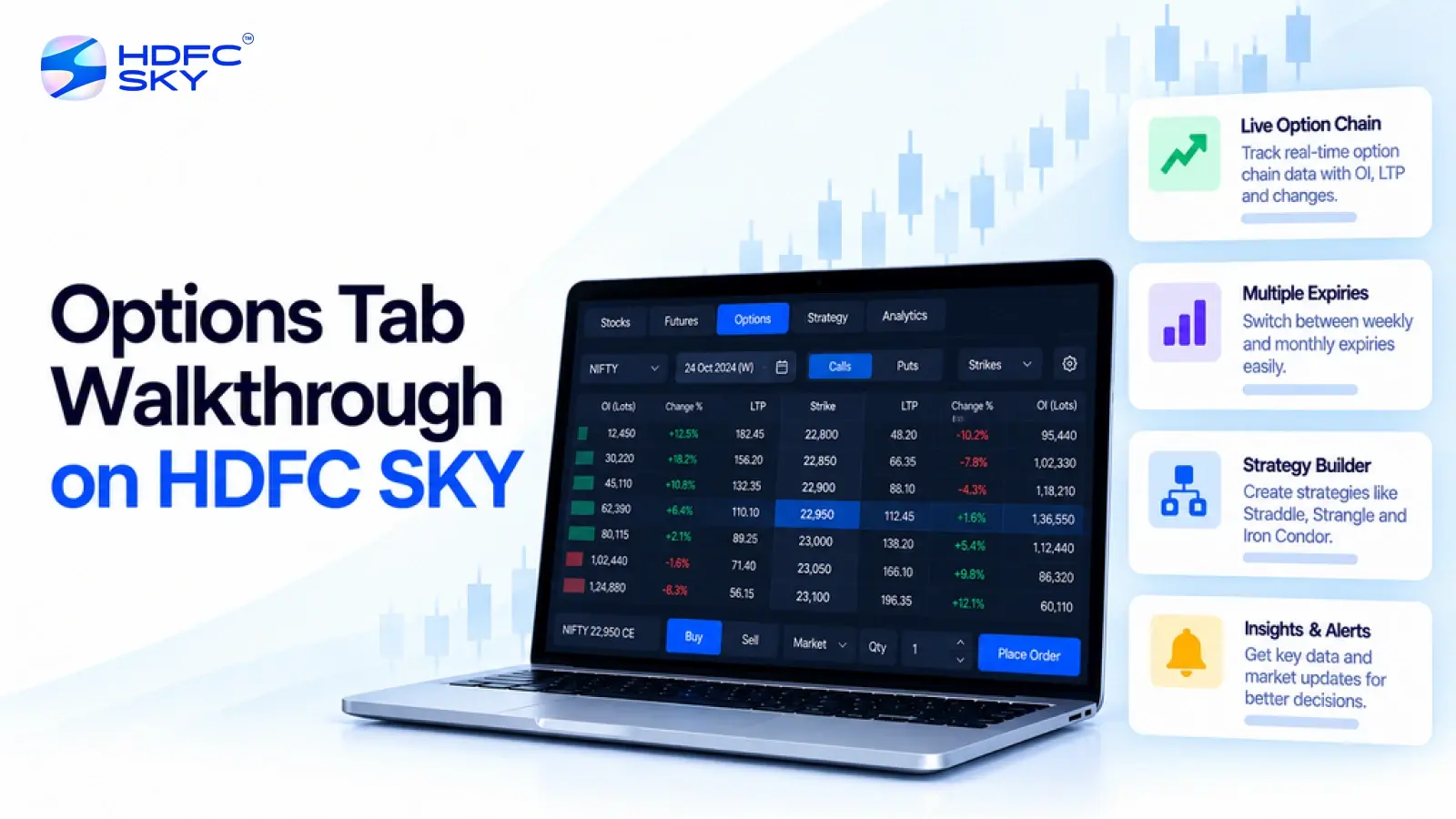
Options traders often track several data points before assessing a contract. HDFC SKY brings key option-chain information into one view, making it easier to compare strikes and expiries. You can track Open Interest (OI), OI Change, and Implied Volatility (IV), while Max Pain adds an expiry-focused reference. This walkthrough explains where to find these metrics on HDFC SKY and how to read them together without relying on any single indicator.
How to Access the Options Tab on HDFC SKY
You can reach the option chain from the relevant stock or index page and select “See Option Chain”. You can also access F&O tools through the HDFC SKY dashboard.
Follow these simple steps:
1. Open the HDFC SKY app or web platform.
2. Open the F&O section or search for the stock or index you want to analyse.
3. Select the relevant stock or index page.
4. Open the F&O/Option section.
5. Select “See Option Chain”.
6. Choose the required expiry to view the available strikes and contract data.
HDFC SKY’s option-chain platform provides live option-chain data across stocks and indices, including strike prices and Open Interest.
Understanding the HDFC SKY Option Chain Layout
Before looking at individual metrics, understand how the option chain organises the information. The layout helps you compare Calls and Puts across different strike prices.
1. Calls and Puts
The option chain places Call data on one side and Put data on the other, with strike prices forming the central reference. This layout lets you compare activity around the same strike from both sides.
2. Strike Price
The strike price represents the price at which the option holder can exercise the contract, subject to the option type and contract terms. Compare nearby strikes rather than focusing on only one contract. This gives you a broader view of where option activity is concentrated.
3. Expiry
Select the expiry before analysing OI, IV, or Max Pain. These values can differ across expiries, so comparing contracts from different expiry dates can lead to an incorrect reading.
OI: Where Option Positions Are Concentrated
Open Interest tells you how many option contracts remain open. When market participants create new contracts, OI increases. When they close existing contracts, OI decreases.
1. High Call OI Can Highlight Resistance
A strike with high Call OI can act as a potential resistance zone. Traders often watch such strikes because concentrated Call OI may indicate strong activity around that level. However, OI alone cannot tell you whether buyers or sellers control those positions. Every option contract has both a buyer and a seller.
2. High Put OI Can Highlight Support
A strike with high Put OI can act as a potential support zone. Traders often track the strike with the highest Put OI when assessing where the underlying may find support. Similarly, a strike with high Call OI can act as a potential resistance zone, as traders may track the highest Call OI to identify areas where the underlying could face resistance.
3. OI Change Shows What Is Changing
OI Change compares current open interest with the previous level. A rise means more contracts remain open, while a fall means positions have reduced. Look at OI and OI Change together. A large OI number tells you where positions have accumulated, while OI Change shows whether that activity is increasing or decreasing.
Understanding Implied Volatility on HDFC SKY
Implied Volatility, or IV, shows the level of future volatility that the option price implies. It does not tell you whether the underlying will move up or down. HDFC SKY provides IV within the option-chain Greeks view. You can open the Greeks section above the option table to view IV along with other option Greeks.
1. Higher IV Can Mean Higher Option Premiums
Higher IV generally supports higher option premiums, all else being equal. The market prices greater expected movement into the option.
2. Lower IV Reflects Lower Expected Movement
Lower IV indicates that the option price reflects lower expected volatility. It does not mean the underlying cannot make a large move.
3. IV Does Not Predict Direction
IV measures expected movement, not direction. An option can carry high IV whether traders expect a sharp rise, a sharp fall, or uncertainty around the next move. Always read IV alongside the underlying price, expiry, strike, and option premium.
Also Read: Futures Tab Walkthrough on HDFC SKY: Where to Find Basis, Rollover, and OI Data
Max Pain: An Expiry-Focused Reference
Max Pain gives you an additional reference based on the Open Interest distribution across strikes for a selected expiry.
The calculation identifies the strike where option holders, taken together, would face the greatest aggregate loss at expiry. It also represents the point where the aggregate payout to option holders would be lowest.
1. Max Pain Depends on the Expiry
Max Pain can change when the OI distribution changes. Therefore, always check the selected expiry before using the figure in your analysis.
2. Max Pain Is Not an Expiry Price Forecast
Do not treat Max Pain as a target or prediction for where the underlying will expire. It simply gives you an expiry-related reference based on the current option-chain structure.
3. Compare Max Pain with OI Levels
Max Pain becomes more useful when you compare it with high Call OI, high Put OI, and the current underlying price. This gives you more context than using Max Pain alone.
A Simple HDFC SKY Option-Chain Walkthrough
Consider this hypothetical example to understand how the metrics work together.
Suppose NIFTY trades at 24,200. The option chain shows:
- Highest Call OI: 24,500
- Highest Put OI: 24,000
- Max Pain: 24,200
- IV: Higher than the previous session
You could treat 24,500 as a potential resistance zone and 24,000 as a potential support zone. Max Pain at 24,200 gives you an additional expiry reference. The higher IV tells you that the option premiums reflect greater expected volatility. None of these figures guarantees the next market move. Price action, volume, time to expiry, and broader market conditions can change the interpretation.
What Makes the HDFC SKY Options Tab Useful
The main advantage comes from bringing several pieces of option-chain information into the same workflow.
- Compare Call and Put OI across strikes.
- Track changes in OI.
- Check IV through the Greeks view.
- Switch between different expiry dates.
- Review option contracts directly from the chain.
HDFC SKY also provides an advanced F&O dashboard with option and futures-chain tools and Open Interest analysis.
Conclusion
An option chain becomes easier to understand when you read its data in context. HDFC SKY brings OI, OI Change, and IV into the option-chain experience, while Max Pain adds an expiry reference. Use these metrics together, check the underlying price and expiry, and avoid treating one measure as a prediction.



Open Free Demat Account
Open Free Demat Account
Popular Posts
- 10 Interesting Facts About NSE You Probably Didn’t KnowLast Updated: Sep 30, 2026
- 8-4-3 Rule of SIP - How Does That Work?Last Updated: Jul 30, 2025
- Let's view more exciting Post!
Popular Post from Derivatives
- Curated Algo Strategies on HDFC SKY: How to Read Strategy Performance Before You SubscribeLast Updated: Oct 29, 2026
- How to Deploy Your First Algo Strategy on HDFC SKY via AlgoBulls: A Step-by-Step GuideLast Updated: Oct 29, 2026
- Futures Tab Walkthrough on HDFC SKY: Where to Find Basis, Rollover, and OI DataLast Updated: Oct 29, 2026
- The F&O Details Page on HDFC SKY: Futures & Options Tabs ExplainedLast Updated: Oct 29, 2026
- How to Set Up Scalper Mode on Web for Nifty & Bank Nifty OptionsLast Updated: Oct 22, 2026
- Let's view more exciting Post!
Popular Post from Blogs
- “Bounce Back” Theme Gains Traction in 2026Last Updated: Apr 8, 2026
- 5 Takeaways for Tax Payers from the Budget 2025Last Updated: Jan 29, 2026
- Let’s view more exciting Posts

Invest Anytime, Anywhere


By signing up I certify terms, conditions & privacy policy