Nifty 50
- Adani Ports₹1,862.90101.60 (5.77%)
- Trent₹2,875-38.90 (-1.33%)
- Adani Enterprises₹2,618.10138.30 (5.58%)
- Maruti Suzuki₹11,443-136.00 (-1.17%)
- Power Grid Corp₹262.1010.70 (4.26%)
- SBI Life Insurance ₹1,649.60-17.10 (-1.03%)
- Kotak Mahindra Bank₹457.9517.95 (4.08%)
- Bajaj Auto₹10,390-95.00 (-0.91%)
- Eternal₹337.3511.35 (3.48%)
- Hindalco Industries₹887.20-6.55 (-0.73%)
- Hindustan Unilever₹1,866.9051.10 (2.81%)
- Eicher Motors₹7,259.50-40.50 (-0.55%)
- Titan Company₹4,450.50112.60 (2.60%)
- Tech Mahindra₹1,768.90-7.70 (-0.43%)
- Bajaj Finance₹940.9523.70 (2.58%)
- Tata Steel₹168.98-0.29 (-0.17%)
- NTPC₹311.157.40 (2.44%)
- InterGlobe Aviation₹4,685-5.00 (-0.11%)
- ITC₹265.806.30 (2.43%)

- Offerings
- Tools & Platforms
Tools & Calculators
- Open API
- Calculators
- SIP Calculator
- CAGR Calculator
- Compound Interest Calculator
- FD Calculator
- RD Calculator
- EPF Calculator
- Retirement Calculator
- HDFC SIP Calculator
- Mutual Fund Return Calculator
- Lumpsum Calculator
- Step Up SIP Calculator
- ETF SIP Calculator
- Brokerage Calculator
- Equity Margin Calculator
- SWP Calculator
- EMI Calculator
- MTF Calculator
- Margin Pledge Calculator
- Algo Strategy
- Markets
Stocks
F&O
Mutual Funds
- More
- What Are Holdings, Positions, and Funds?
- Complete Authentication Before Accessing Portfolio APIs
- Understand the Required Request Headers
- Fetch Holdings Through the HDFC SKY API
- Retrieve Day-Wise and Net-Wise Positions
- Convert Positions When Required
- View Funds and Margin Information
- How Do These APIs Work Together?
- Best Practices for Portfolio API Integration
- Common Mistakes to Avoid
- Conclusion
- What Are Holdings, Positions, and Funds?
- Complete Authentication Before Accessing Portfolio APIs
- Understand the Required Request Headers
- Fetch Holdings Through the HDFC SKY API
- Retrieve Day-Wise and Net-Wise Positions
- Convert Positions When Required
- View Funds and Margin Information
- How Do These APIs Work Together?
- Best Practices for Portfolio API Integration
- Common Mistakes to Avoid
- Conclusion
Pulling Holdings, Positions, and Funds via HDFC SKY API
By HDFC SKY | Published at: Oct 29, 2026 02:41 PM IST
Open Free Demat Account
Open Free Demat Account
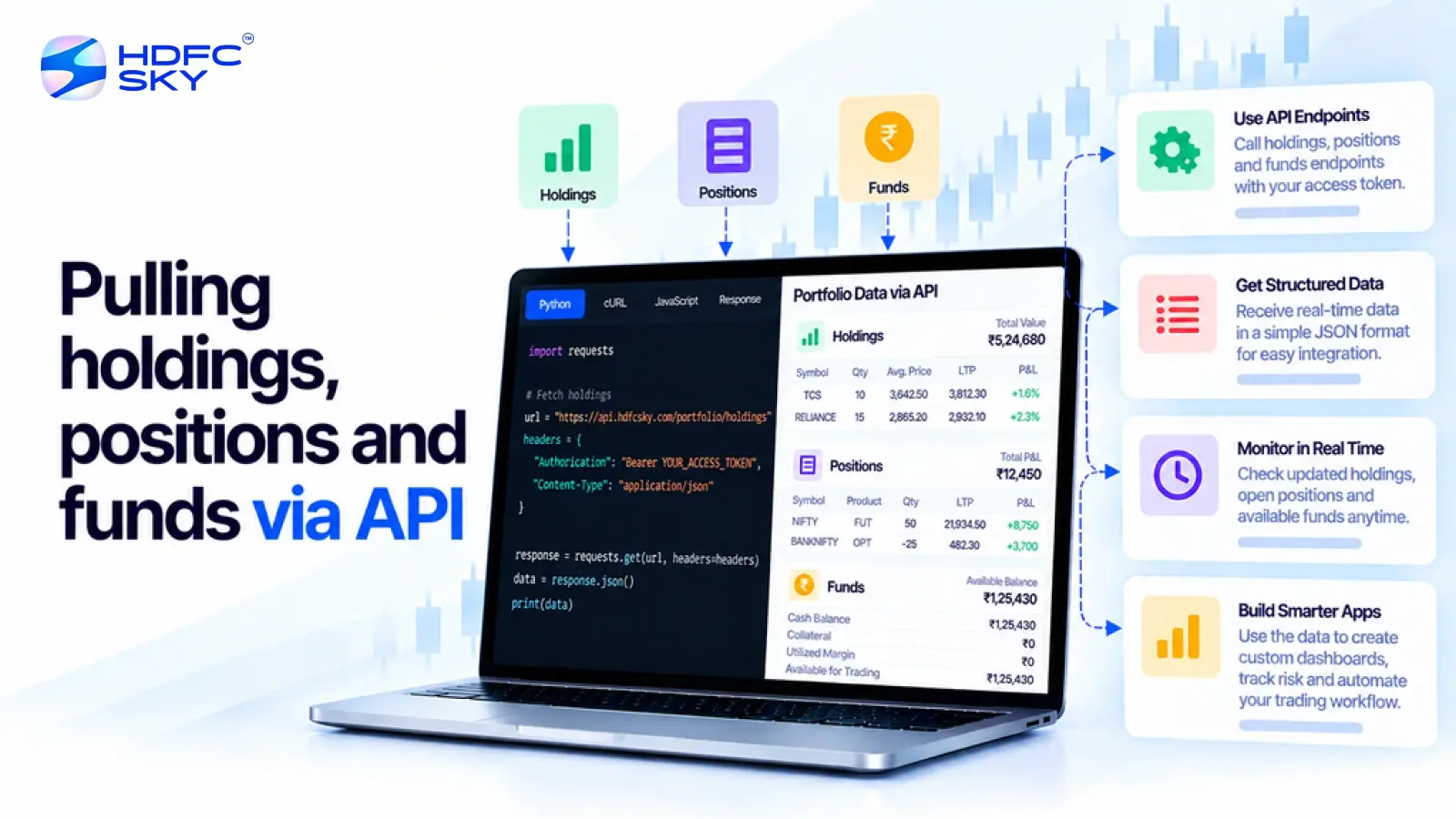
Managing investments becomes much easier when your application can retrieve portfolio information automatically. The HDFC SKY Open API allows developers to access holdings, positions, and funds after completing the required authentication process. These APIs help applications display investment data without manual intervention. This guide explains how to retrieve portfolio information through the HDFC SKY API, the authentication requirements, and the best practices for building secure and reliable applications.
Before you start working with these APIs, it is helpful to understand the different types of portfolio information available.
What Are Holdings, Positions, and Funds?
The HDFC SKY Open API provides separate services for retrieving different types of account information. Each one serves a specific purpose.
- Holdings
Holdings represent the securities currently available in your Demat account. These are generally investments that you continue to own after settlement.
Applications use holdings data to:
Display long-term investments.
Show portfolio composition.
Track current investment value.
Generate portfolio summaries. - Positions
Positions represent your trading exposures. Depending on the API used, you can retrieve day-wise positions for the current session or net-wise positions that provide a consolidated view of your positions.
Position data helps applications:
Monitor active trades.
Display open exposures.
Track trading activity.
Calculate realised and unrealised positions. - Funds
Funds APIs provide information about the trading account balance and available margins.
Applications commonly use this information to:
Display available trading funds.
Show utilised margins.
Monitor account balances.
Help users understand their available buying power.
Together, these APIs provide a complete picture of a user’s trading account. Before retrieving any portfolio information, your application must complete the authentication process.
Complete Authentication Before Accessing Portfolio APIs
The Holdings, Positions, and Funds APIs are protected services. Your application must authenticate successfully before requesting account information.
Once authentication is complete, your application can access the APIs authorised by the user. Every authenticated request must include the required headers.
Understand the Required Request Headers
The HDFC SKY APIs use request headers to verify the identity of both the application and the authenticated user.
A typical authenticated request includes:
- A valid Access Token in the Authorization header.
- Your registered API Key.
- Content-Type: application/json for supported REST requests.
These headers help HDFC SKY verify the request before returning portfolio information. Once authentication is complete, you can retrieve investment holdings.
Also Read: HDFC SKY API Rate Limits, Session Validity, and Token Management Explained
Fetch Holdings Through the HDFC SKY API
The Holdings API allows your application to retrieve securities available in the user’s Demat account. Depending on the information returned by the API, applications can display details such as:
- Security name
- Quantity held
- Exchange
- Product information
- Other supported holding details
This information helps users view their investments without logging in to multiple platforms.
For delivery-based transactions, HDFC SKY also supports eDIS-related services for eligible holdings where authorisation is required before selling certain securities.
Retrieve Day-Wise and Net-Wise Positions
HDFC SKY provides APIs for retrieving different types of trading positions. The Positions API provides information about trading positions.
- Day-Wise Positions
Day-wise positions display trading activity for the current trading session.
Applications use this information to:
Monitor intraday trades.
Display current open positions.
Track ongoing trading activity. - Net-Wise Positions
Net-wise positions provide a consolidated view of your trading positions after considering all eligible transactions. This information helps users:
Review overall trading exposure.
Analyse completed trades.
Monitor portfolio positions over time.
Displaying both views gives users a clearer understanding of their trading activity.
Convert Positions When Required
Some applications also allow users to change the product type of eligible positions. The HDFC SKY API supports position conversion for eligible trades.
For example, developers can convert supported positions between available product types, such as converting supported intraday positions to delivery positions, where permitted.
Before requesting a conversion, applications should:
- Verify that the position is eligible.
- Ensure the user has sufficient funds or margin, where applicable.
- Complete the request using the authenticated session.
Position conversion follows the rules and validations defined by HDFC SKY.
View Funds and Margin Information
Applications can also retrieve account balance information. The Funds API helps applications retrieve information related to the trading account. Depending on the services available for your account, applications can display:
- Available trading balance
- Allocated margins
- Cash balance
- Ledger-related information
- Other supported account balance details
Displaying fund information allows users to understand the amount available before placing trades.
How Do These APIs Work Together?
After understanding the available APIs, it is useful to know how they work together. Holdings, Positions, and Funds APIs provide different pieces of account information. Together, they help applications build a complete portfolio view.
For example, an investment dashboard can:
- Display current holdings.
- Show open trading positions.
- Present available trading funds.
- Monitor overall portfolio activity.
- Display updated account information after successful authentication.
Using these APIs together creates a more informative experience for users.
Best Practices for Portfolio API Integration
Following a few simple practices can improve the reliability of your integration. Consider the following recommendations while working with the HDFC SKY APIs.
- Authenticate users before requesting portfolio information.
- Use a valid Access Token for every authenticated session.
- Keep your API Key and API Secret secure.
- Configure the required Static IP address, where applicable.
- Request only the data needed by your application.
- Handle authentication failures gracefully.
- Follow the API usage guidelines published by HDFC SKY.
These practices improve both security and application performance.
Common Mistakes to Avoid
Developers can also avoid a few common issues during implementation. The following mistakes often lead to authentication or data retrieval errors.
- Making API requests without a valid Access Token.
- Using expired authentication credentials.
- Sending incomplete request headers.
- Using incorrect application credentials.
- Ignoring authentication or authorisation errors.
- Requesting portfolio data before the user completes authentication.
Avoiding these issues helps applications retrieve portfolio information more reliably.
Conclusion
The HDFC SKY Open API makes it easier to retrieve holdings, positions, and funds after successful authentication. By understanding how these APIs work together and following the recommended authentication and security practices, developers can build applications that display portfolio information accurately, securely, and efficiently while providing users with a smooth investment management experience.



Open Free Demat Account
Open Free Demat Account
Popular Posts
- 10 Interesting Facts About NSE You Probably Didn’t KnowLast Updated: Sep 30, 2026
- 8-4-3 Rule of SIP - How Does That Work?Last Updated: Jul 30, 2025
- Let's view more exciting Post!
Popular Post from Trading Strategies
- Fetching Market Depth (Level 2) Through the HDFC SKY APILast Updated: Oct 29, 2026
- Streaming Live Market Data with HDFC SKY WebSocket: Setup GuideLast Updated: Oct 29, 2026
- Placing Your First Order via the HDFC SKY API: MARKET, LIMIT, SL, and SL-M Orders ExplainedLast Updated: Oct 29, 2026
- HDFC SKY API Rate Limits, Session Validity, and Token Management ExplainedLast Updated: Oct 29, 2026
- Getting Started with the HDFC SKY API in PythonLast Updated: Oct 22, 2026
- Let's view more exciting Post!
Popular Post from Blogs
- “Bounce Back” Theme Gains Traction in 2026Last Updated: Apr 8, 2026
- 5 Takeaways for Tax Payers from the Budget 2025Last Updated: Jan 29, 2026
- Let’s view more exciting Posts

Invest Anytime, Anywhere


By signing up I certify terms, conditions & privacy policy