Nifty 50
- Adani Ports₹1,863.10101.80 (5.78%)
- Trent₹2,869.10-44.80 (-1.54%)
- Adani Enterprises₹2,621141.20 (5.69%)
- Maruti Suzuki₹11,431-148.00 (-1.28%)
- Power Grid Corp₹262.0510.65 (4.24%)
- Bajaj Auto₹10,360-125.00 (-1.19%)
- Kotak Mahindra Bank₹458.3018.30 (4.16%)
- SBI Life Insurance ₹1,649.60-17.10 (-1.03%)
- Eternal₹337.3511.35 (3.48%)
- Cipla₹1,357.80-7.80 (-0.57%)
- Hindustan Unilever₹1,86549.20 (2.71%)
- Hindalco Industries₹889.85-3.90 (-0.44%)
- Bajaj Finance₹94224.75 (2.70%)
- Tech Mahindra₹1,768.90-7.70 (-0.43%)
- NTPC₹3117.25 (2.39%)
- Eicher Motors₹7,269-31.00 (-0.42%)
- Titan Company₹4,437.6099.70 (2.30%)
- Tata Steel₹169-0.27 (-0.16%)
- Tata Consumer ₹1,02221.80 (2.18%)
- InterGlobe Aviation₹4,685-5.00 (-0.11%)

- Offerings
- Tools & Platforms
Tools & Calculators
- Open API
- Calculators
- SIP Calculator
- CAGR Calculator
- Compound Interest Calculator
- FD Calculator
- RD Calculator
- EPF Calculator
- Retirement Calculator
- HDFC SIP Calculator
- Mutual Fund Return Calculator
- Lumpsum Calculator
- Step Up SIP Calculator
- ETF SIP Calculator
- Brokerage Calculator
- Equity Margin Calculator
- SWP Calculator
- EMI Calculator
- MTF Calculator
- Margin Pledge Calculator
- Algo Strategy
- Markets
Stocks
F&O
Mutual Funds
- More
- What Is the HDFC SKY WebSocket API?
- Why Use the HDFC SKY WebSocket API?
- Before You Begin the Setup
- Connecting to the HDFC SKY WebSocket
- Subscribing to Live Market Data
- What Market Data Can You Receive?
- Understanding Exchange Prefixes
- Understanding WebSocket Connection Limits
- Understanding Heartbeat Messages
- Good Practices for WebSocket Integration
- Common Mistakes to Avoid
- Conclusion
- What Is the HDFC SKY WebSocket API?
- Why Use the HDFC SKY WebSocket API?
- Before You Begin the Setup
- Connecting to the HDFC SKY WebSocket
- Subscribing to Live Market Data
- What Market Data Can You Receive?
- Understanding Exchange Prefixes
- Understanding WebSocket Connection Limits
- Understanding Heartbeat Messages
- Good Practices for WebSocket Integration
- Common Mistakes to Avoid
- Conclusion
Streaming Live Market Data with HDFC SKY WebSocket: Setup Guide
By HDFC SKY | Updated at: Oct 29, 2026 02:21 PM IST
Open Free Demat Account
Open Free Demat Account
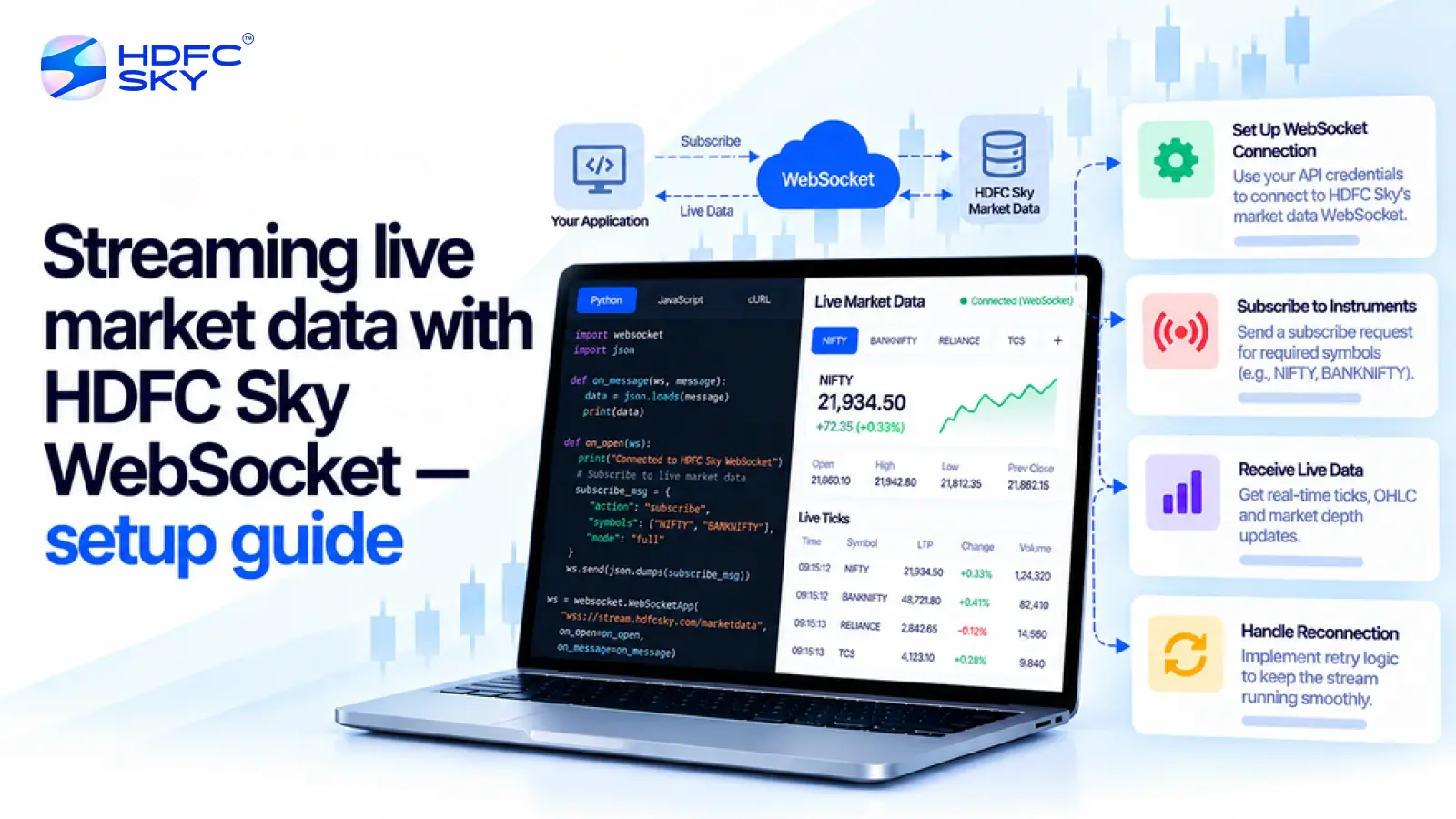
Real-time market data plays an important role in modern trading and investment applications. Investors often need live price updates, market depth, and trading activity without repeatedly refreshing their screens. The HDFC SKY WebSocket API makes this possible by delivering continuous market data through a single connection. This guide explains how to set up the HDFC SKY WebSocket API, authenticate your application, and start streaming live market data in a simple, beginner-friendly way.
What Is the HDFC SKY WebSocket API?
Before setting up the connection, it is helpful to understand what a WebSocket API does. A WebSocket creates a continuous connection between your application and the HDFC SKY platform. Instead of sending repeated requests for market data, your application receives updates automatically whenever new information becomes available.
This approach makes real-time data delivery faster and more efficient than repeatedly calling REST APIs. It also reduces network traffic and improves the overall performance of trading applications.
Why Use the HDFC SKY WebSocket API?
The WebSocket API offers several advantages for applications that require continuous market updates.
Some of the key benefits include:
- Live market updates without repeated API requests.
- Access to real-time quotes across supported exchanges.
- Reduced network usage compared to frequent REST API calls.
- Improved application responsiveness during market hours.
- Market data streaming with low latency.
- Monitoring of multiple securities through a single connection.
These advantages make the WebSocket API suitable for trading platforms, portfolio trackers, watchlists, market dashboards, and research applications.
Before You Begin the Setup
Before establishing a WebSocket connection, make sure your application meets the required setup requirements.
- Create a Developer Account
Start by creating a developer account on the HDFC SKY Developer Portal. This portal allows you to register applications, manage API credentials, and access the available APIs. - Register Your Application
After signing in, create a new application from the Developer Portal.
During registration, you will receive:
API Key
API Secret
These credentials identify your application during authentication. - Configure Your Redirect URL
Register a valid Redirect URL while creating your application.
After successful user authentication, HDFC SKY redirects users to this URL and includes the temporary Request Token needed for generating the Access Token. - Configure Static IP Addresses
HDFC SKY requires developers to register Static IP addresses for API-enabled applications.
This requirement supports exchange compliance and helps establish secure communication between your application and the platform.
Also Read: HDFC SKY Open API: A Complete Guide to Building Smarter Investment and Trading Applications
Connecting to the HDFC SKY WebSocket
Before your application can receive live market data, it must complete the authentication process. After successful validation of the process, the platform returns an Access Token.
After obtaining a valid Access Token, your application can establish a WebSocket connection. The connection remains active during the session and continuously streams market updates without requiring repeated polling through REST APIs.
During connection setup, your application establishes the WebSocket connection and authenticates the session using a valid Access Token.
Once the session is established successfully, your application becomes ready to receive live market updates.
Subscribing to Live Market Data
After connecting successfully, the next step is to subscribe to the market data you want to receive.
Instead of receiving updates for every listed security, your application subscribes only to selected instruments.
A subscription request typically specifies:
- The exchange or market segment
- The security identifier (Scrip ID)
- The type of market data required, such as Last Traded Price (LTP) or complete market data
Your application can also unsubscribe from instruments whenever live updates are no longer required. This helps manage bandwidth efficiently while keeping the connection organised.
What Market Data Can You Receive?
Once your application subscribes to an instrument, the HDFC SKY WebSocket API begins streaming live market data as it becomes available. This allows your application to display real-time information without repeatedly sending requests to the server.
Depending on the subscription type and the exchange segment, your application can receive the following information:
- Last Traded Price (LTP)
The Last Traded Price (LTP) shows the most recent price at which a security was traded. It is one of the most commonly used data points for live price monitoring and watchlists. - Open, High, Low, and Close (OHLC)
The WebSocket API can stream the day’s:
Opening price
Highest traded price
Lowest traded price
Previous closing price
These values help investors analyse intraday price movements and compare current trading activity with earlier market levels. - Market Depth
Depending on the subscription type and instrument, the WebSocket API can stream market depth data with up to five bid and offer levels. Market depth provides multiple levels of buy and sell orders available in the market. HDFC SKY supports up to five levels of bid and offer depth, allowing applications to present a more detailed view of market liquidity. - Index Data
Applications can also subscribe to supported market indices.
This allows users to monitor the live movement of major market indices alongside individual securities within the same application. - Market Status Updates
The WebSocket connection also delivers market status information for supported exchanges and market segments.
Applications can use these updates to identify whether a market is open, closed, or in another trading phase.
Understanding Exchange Prefixes
When subscribing to market data, every instrument must include the correct exchange and segment prefix. These prefixes help the WebSocket service identify the requested security.
Some commonly used prefixes include:
- NSE_ for NSE Cash Market instruments
- NFO_ for NSE Futures and Options
- BSE_ for BSE Cash Market instruments
- BFO_ for BSE Futures and Options
- MCX_ for MCX Futures
- NSE_INDEX_ for NSE indices
- BSE_INDEX_ for BSE indices
Using the correct prefix ensures that your subscription request reaches the intended market segment.
Understanding WebSocket Connection Limits
To maintain stable performance, HDFC SKY defines connection limits for WebSocket usage.
According to the developer documentation:
- Maximum Instruments per Connection
A single WebSocket connection can subscribe to live market data for up to 300 instruments.
This allows developers to monitor a large number of securities without creating multiple connections unnecessarily. - Maximum WebSocket Connections
Each API Key supports up to three simultaneous WebSocket connections.
This enables developers to separate different data streams across applications or modules while remaining within the supported connection limits.
Following these limits helps maintain reliable performance and ensures efficient use of the WebSocket service.
Understanding Heartbeat Messages
A WebSocket connection remains active for long periods. The WebSocket API supports heartbeat packets that help applications monitor whether the connection remains active.
Heartbeat packets help:
- Confirm that the connection is active.
- Detect unexpected connection interruptions.
- Allow applications to reconnect when required.
Monitoring heartbeat messages helps improve the reliability of applications that depend on continuous market updates.
Good Practices for WebSocket Integration
Following a few simple practices can help you build a stable and efficient WebSocket integration.
Consider the following recommendations:
- Complete authentication before establishing the WebSocket connection.
- Use a valid Access Token for every authenticated session.
- Register the required Static IP address for your application.
- Subscribe only to the instruments your application needs.
- Remove unused subscriptions whenever possible.
- Monitor heartbeat messages to detect connection issues.
- Reconnect gracefully if the WebSocket session is interrupted.
- Stay within the supported connection and subscription limits.
These practices help improve application performance while ensuring a reliable streaming experience.
Common Mistakes to Avoid
Developers new to WebSocket integration often encounter a few avoidable issues. Understanding them in advance can simplify the setup process.
Some common mistakes include:
- Attempting to connect without completing authentication.
- Using an expired Access Token.
- Registering an incorrect Redirect URL.
- Forgetting to configure the required Static IP address.
- Exceeding the documented subscription or WebSocket connection limits.
- Requesting live data through repeated REST API calls instead of using the WebSocket connection.
Avoiding these mistakes can reduce connection failures and improve application stability.
Conclusion
The HDFC SKY WebSocket API provides an efficient way to stream live market data directly into your applications. After completing authentication and establishing a WebSocket connection, you can subscribe to supported instruments and receive continuous updates such as live prices, OHLC values, market depth, and market status. By following the documented setup process and supported connection limits, developers can build responsive and reliable applications that deliver real-time market information efficiently



Open Free Demat Account
Open Free Demat Account
Popular Posts
- 10 Interesting Facts About NSE You Probably Didn’t KnowLast Updated: Sep 30, 2026
- 8-4-3 Rule of SIP - How Does That Work?Last Updated: Jul 30, 2025
- Let's view more exciting Post!
Popular Post from Trading Strategies
- Pulling Holdings, Positions, and Funds via HDFC SKY APILast Updated: Oct 29, 2026
- Fetching Market Depth (Level 2) Through the HDFC SKY APILast Updated: Oct 29, 2026
- Placing Your First Order via the HDFC SKY API: MARKET, LIMIT, SL, and SL-M Orders ExplainedLast Updated: Oct 29, 2026
- HDFC SKY API Rate Limits, Session Validity, and Token Management ExplainedLast Updated: Oct 29, 2026
- Getting Started with the HDFC SKY API in PythonLast Updated: Oct 22, 2026
- Let's view more exciting Post!
Popular Post from Blogs
- “Bounce Back” Theme Gains Traction in 2026Last Updated: Apr 8, 2026
- 5 Takeaways for Tax Payers from the Budget 2025Last Updated: Jan 29, 2026
- Let’s view more exciting Posts
Invest Anytime, Anywhere


By signing up I certify terms, conditions & privacy policy