Nifty 50
- Adani Ports₹1,862.90101.60 (5.77%)
- Trent₹2,869.10-44.80 (-1.54%)
- Adani Enterprises₹2,621141.20 (5.69%)
- Maruti Suzuki₹11,443-136.00 (-1.17%)
- Power Grid Corp₹262.1010.70 (4.26%)
- SBI Life Insurance ₹1,649.60-17.10 (-1.03%)
- Kotak Mahindra Bank₹458.3018.30 (4.16%)
- Bajaj Auto₹10,390-95.00 (-0.91%)
- Eternal₹337.3511.35 (3.48%)
- Cipla₹1,357.80-7.80 (-0.57%)
- Hindustan Unilever₹1,86549.20 (2.71%)
- Hindalco Industries₹889.85-3.90 (-0.44%)
- Bajaj Finance₹94224.75 (2.70%)
- Tech Mahindra₹1,768.90-7.70 (-0.43%)
- NTPC₹311.157.40 (2.44%)
- Eicher Motors₹7,269-31.00 (-0.42%)
- Titan Company₹4,437.6099.70 (2.30%)
- Tata Steel₹169-0.27 (-0.16%)
- Tata Consumer ₹1,02221.80 (2.18%)
- InterGlobe Aviation₹4,685-5.00 (-0.11%)

- Offerings
- Tools & Platforms
Tools & Calculators
- Open API
- Calculators
- SIP Calculator
- CAGR Calculator
- Compound Interest Calculator
- FD Calculator
- RD Calculator
- EPF Calculator
- Retirement Calculator
- HDFC SIP Calculator
- Mutual Fund Return Calculator
- Lumpsum Calculator
- Step Up SIP Calculator
- ETF SIP Calculator
- Brokerage Calculator
- Equity Margin Calculator
- SWP Calculator
- EMI Calculator
- MTF Calculator
- Margin Pledge Calculator
- Algo Strategy
- Markets
Stocks
F&O
Mutual Funds
- More
Placing Your First Order via the HDFC SKY API: MARKET, LIMIT, SL, and SL-M Orders Explained
By HDFC SKY | Published at: Oct 29, 2026 01:54 PM IST
Open Free Demat Account
Open Free Demat Account
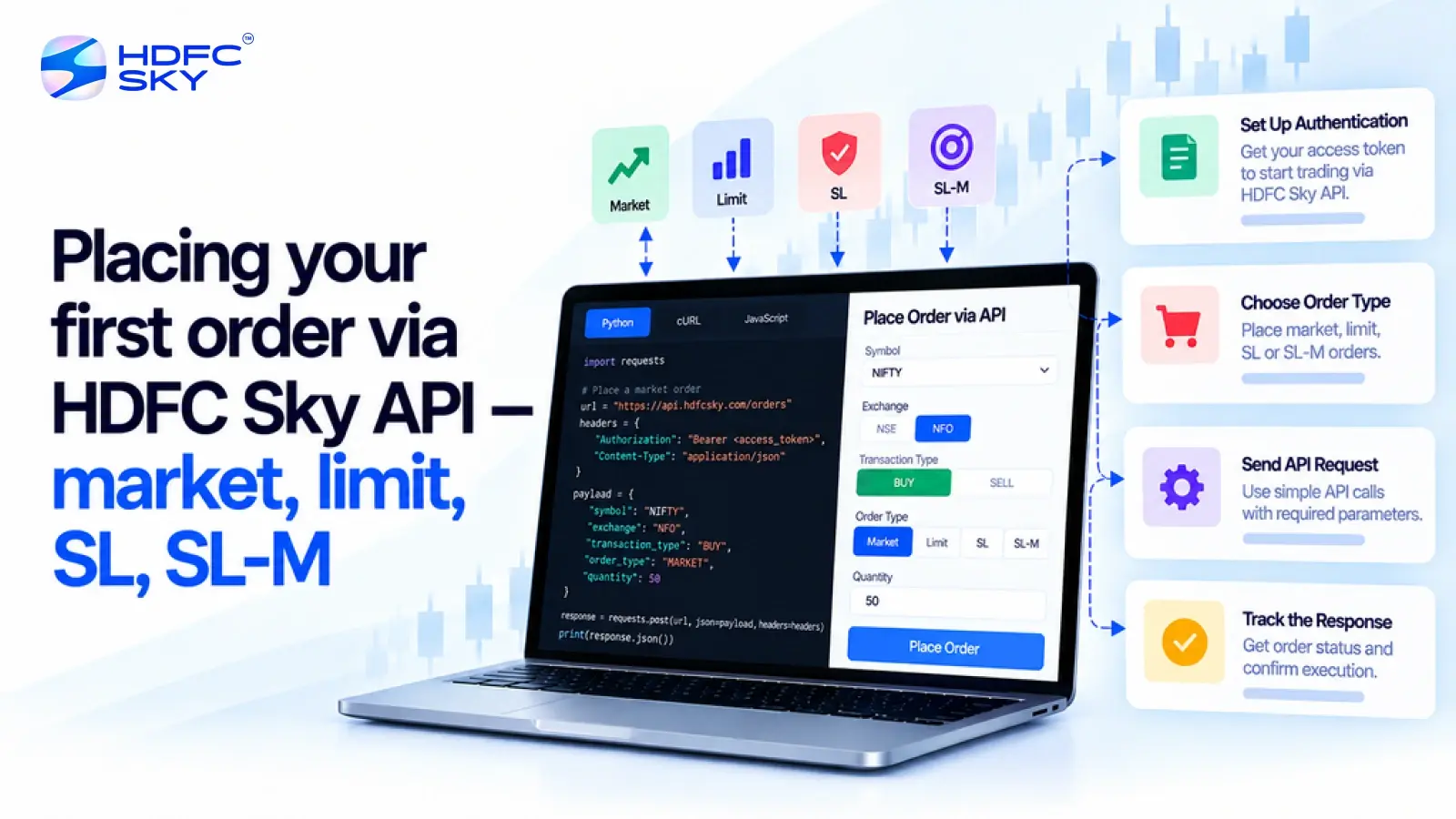
Once you have successfully integrated the HDFC SKY Open API, the next step is placing your first order. The Order API allows your application to submit buy or sell orders directly to the market after successful authentication. However, before sending an order, it is important to understand the available order types and the information required for each one. This guide explains the process in simple language and helps you place your first API order with confidence.
What Do You Need Before Placing Your First Order?
Before your application can submit an order through the HDFC SKY API, complete the following requirements.
- Have an active HDFC SKY trading account.
- Register your application on the HDFC SKY Developer Portal.
- Generate your API Key and API Secret.
- Complete the authentication process and obtain a valid Access Token.
- Configure the required Static IP Address, where applicable, to comply with exchange requirements.
- Identify the correct trading symbol or security identifier for the instrument you want to trade.
Once these steps are complete, your application is ready to place authorised orders.
How Does the HDFC SKY Order API Work?
Every order follows a simple sequence.
- Your application first authenticates the user and obtains a valid Access Token.
- It then prepares the order request by including all the required order details.
- Finally, it sends a POST request to the HDFC SKY Order API.
If the request is valid, HDFC SKY forwards the order for processing and execution based on the selected order type and prevailing market conditions.
What Information Is Required to Place an Order?
Every order request contains a few essential details. The exact parameters may vary depending on the selected order type, but a typical order request includes:
- Exchange
- Trading symbol or security identifier
- Quantity
- Product type
- Order type
- Order validity
- Price, where applicable
- Trigger price, where applicable
Some fields are mandatory only for specific order types. For example, MARKET orders do not require a price, while LIMIT and Stop Loss orders do.
Also Read: HDFC SKY API Authentication and Login Flow Explained
Why Is It Important to Understand Order Types?
Before placing your first order, it helps to understand how each order type works. HDFC SKY supports multiple order types, and each one serves a different purpose. Selecting the right order type allows you to execute trades according to your trading objective and market conditions.
- Understanding MARKET Orders
A MARKET order is the simplest order type available.
A MARKET order executes immediately at the best available market price. Since the execution price depends on the current market, you do not specify a price while placing the order.
A MARKET order generally requires:
Order type set to MARKET
Quantity
Exchange
Trading symbol or security identifier
Product type
Order validity
MARKET orders are suitable when immediate execution is more important than executing at a specific price. - Understanding LIMIT Orders
A LIMIT order gives you greater control over the execution price.
Instead of buying or selling immediately, you specify the exact price at which you want the order to execute. The order executes only if the market reaches your specified price or a better price.
A LIMIT order generally requires:
Order type set to LIMIT
Quantity
Price
Exchange
Trading symbol or security identifier
Product type
Order validity
If the market does not reach your specified price, the order remains pending until it is executed, modified, cancelled, or expires. - Understanding Stop Loss Limit (SL) Orders
A Stop Loss Limit (SL) order helps investors manage potential losses.
You specify both a trigger price and a limit price. When the market reaches the trigger price, the system places a LIMIT order using the specified limit price.
An SL order generally requires:
Order type set to SL-L
Quantity
Trigger price
Limit price
Exchange
Trading symbol or security identifier
Product type
Order validity
This order type gives investors greater control over the execution price after the trigger activates. - Understanding Stop Loss Market (SL-M) Orders
An SL-M order also helps manage risk but works differently.
When the market reaches the trigger price, the order immediately becomes a MARKET order. The order then executes at the best available market price.
An SL-M order generally requires:
Order type set to SL-M
Quantity
Trigger price
Exchange
Trading symbol or security identifier
Product type
Order validity
Unlike an SL-L order, an SL-M order does not require a limit price.
What Happens After You Submit an Order?
After your application sends the order request, HDFC SKY validates the request before forwarding it for execution.
Depending on the order details and market conditions, the order may:
- Execute immediately.
- Remain pending.
- Execute partially.
- Be rejected if any required validation fails.
Your application can monitor the latest order status through the relevant HDFC SKY APIs.
Good Practices Before Placing an Order
A few simple checks can help reduce order placement errors.
Before sending an order request, make sure you:
- Use a valid Access Token.
- Verify the trading symbol or security identifier.
- Select the correct order type.
- Enter the correct quantity.
- Specify the required price or trigger price, where applicable.
- Configure the required Static IP Address, where applicable.
- Review the order details carefully before submitting the request.
These checks can help improve the success rate of your API requests.
Conclusion
Placing your first order through the HDFC SKY API becomes much easier once you understand how the Order API works and when to use each order type. By selecting the appropriate order type, providing the required parameters, and completing the authentication process correctly, you can build applications that place orders securely and efficiently using the HDFC SKY platform.



Open Free Demat Account
Open Free Demat Account
Popular Posts
- 10 Interesting Facts About NSE You Probably Didn’t KnowLast Updated: Sep 30, 2026
- 8-4-3 Rule of SIP - How Does That Work?Last Updated: Jul 30, 2025
- Let's view more exciting Post!
Popular Post from Trading Strategies
- Pulling Holdings, Positions, and Funds via HDFC SKY APILast Updated: Oct 29, 2026
- Fetching Market Depth (Level 2) Through the HDFC SKY APILast Updated: Oct 29, 2026
- Streaming Live Market Data with HDFC SKY WebSocket: Setup GuideLast Updated: Oct 29, 2026
- HDFC SKY API Rate Limits, Session Validity, and Token Management ExplainedLast Updated: Oct 29, 2026
- Getting Started with the HDFC SKY API in PythonLast Updated: Oct 22, 2026
- Let's view more exciting Post!
Popular Post from Blogs
- “Bounce Back” Theme Gains Traction in 2026Last Updated: Apr 8, 2026
- 5 Takeaways for Tax Payers from the Budget 2025Last Updated: Jan 29, 2026
- Let’s view more exciting Posts
Invest Anytime, Anywhere


By signing up I certify terms, conditions & privacy policy